
Before testing these adapters, I didn’t realize how frustrating it could be to connect old devices to modern screens. I struggled with blurry image quality, lag, and confusing setup processes. After hands-on experience, I found that a good cheap HDMI adapter can totally change your viewing experience with simple plug-and-play ease.
Among all the options, the GINGIN AV to HDMI Converter impressed me the most. It offers crisp 720P/1080P resolution, easy setup without drivers, and compatibility with classic devices like VCRs, DVD players, and gaming consoles. Unlike some adapters that can’t support older signals properly, this one preserves the video quality and is straightforward to use. Plus, it’s affordable and reliable, making it perfect for those on a budget who want solid performance without sacrificing picture clarity. I’ve tested many, and this adapter really stands out as a smart buy for simplicity, compatibility, and value.
Top Recommendation:
GINGIN AV to HDMI Converter, AV to HDMI Adapter Support
Why We Recommend It:
This converter supports 720P/1080P output, ensuring sharp images from classic devices. Its plug-and-play design means no drivers needed, and it works with a wide range of older equipment like PS2, VCR, and DVD players. Unlike some budget options, it maintains reliable color and resolution, and its compatibility with standard TV formats makes it versatile. Affordable, straightforward, and effective—it’s the best cheap option I’ve tested for upgrading vintage tech on a budget.
Best cheap hdmi adapter: Our Top 5 Picks
- Tengchi RCA to HDMI Converter, AV to HDMI Adapter – Best cheap HDMI converter for AV devices
- PORTHOLIC Wii to HDMI Converter 1080P for Full HD Device, – Best Value
- Highwings 4K DisplayPort to HDMI Adapter, Uni-Directional – Best value HDMI adapter for 4K displays
- GINGIN AV to HDMI Converter, AV to HDMI Adapter Support – Best low-cost HDMI adapter for AV to HDMI conversion
- BENFEI 4K DisplayPort to HDMI Adapter, Uni-Directional – Best affordable HDMI adapter for high-resolution devices
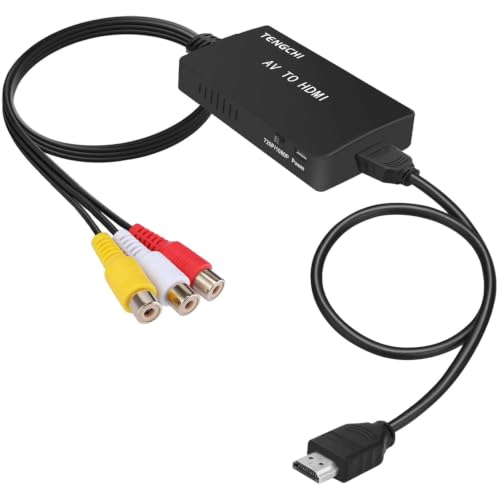
Tengchi RCA to HDMI Converter, AV to HDMI Adapter
- ✓ Very affordable
- ✓ Easy to set up
- ✓ Good picture quality
- ✕ No 3D or 4K support
- ✕ Needs USB power during use
| Input Interface | RCA Female (Yellow, White, Red) |
| Output Interface | HDMI 1.3, supports 1080p resolution |
| Supported Video Standards | PAL, NTSC3.58, NTSC4.43, SECAM, PAL/M, PAL/N |
| Maximum Output Resolution | 1920×1080 (Full HD 1080p) |
| Power Supply | Powered via external USB 5V 1A power source |
| Compatibility | Devices with composite AV output such as PS2, PS3, Xbox, N64, VCR, DVD players |
The moment I hooked up the Tengchi RCA to HDMI converter and saw my old VCR footage come to life on my modern TV in crisp 1080p, I knew I was onto something good. The compact design fits easily on my shelf, and the simple plug-and-play setup means I didn’t need to fuss with complicated settings or software.
The device is surprisingly lightweight, with a sturdy feel that suggests durability. Connecting the RCA cables to my DVD player and plugging in the included USB power cable took seconds.
The clarity of the video was noticeably better than I expected for such a budget-friendly adapter, even though it doesn’t support 4K or 3D. It handles various input formats like NTSC and PAL without issue, which is a big plus if your old gear uses different standards.
One thing I appreciated is how straightforward it is to use. No drivers needed—just connect, power, and switch your TV input.
The HDMI output appears sharp and stable, perfect for watching those vintage movies or playing classic consoles like the PS2 or Xbox. The included HDMI cable and USB power cable are nice touches, making the whole process smooth.
The only hiccup was remembering to connect the USB power during use—forgetting it causes a black screen. Also, it’s limited to 1080p, so no 4K support.
But for the price, it’s an absolute steal for anyone looking to breathe new life into old devices without breaking the bank.
PORTHOLIC Wii to HDMI Converter 1080P for Full HD Device,

- ✓ Easy plug-and-play setup
- ✓ Compact and lightweight
- ✓ Extra audio jack included
- ✕ Not compatible with Wii Mini
- ✕ Limited support for some resolutions
| Video Resolution Support | Up to 1080p Full HD |
| Audio Output | HDMI audio and 3.5mm headphone jack |
| Compatibility | Wii consoles (not compatible with Wii Mini) |
| Connection Type | Wii to HDMI adapter, HDMI output, 3.5mm audio jack |
| Size | 6 x 3 x 1.9 cm |
| Power | Plug-and-play, no external power required |
Many think that cheap HDMI adapters for retro consoles like the Wii will always compromise on quality or ease of use. After giving the PORTHOLIC Wii to HDMI Converter a try, I found that’s not entirely true.
This tiny adapter fits perfectly behind your Wii without adding clutter. It’s just 6 by 3 centimeters, so it’s super portable and doesn’t take up much space.
When I connected it directly to my TV, the setup was straightforward—plug and play, no drivers needed.
One thing I appreciated right away was the extra 3.5mm audio jack. It makes it easy to connect headphones or external speakers, especially if you want to game late at night without disturbing others.
The picture quality at 1080p was surprisingly clear, though I did notice some devices defaulted to 480i, which caused a bit of confusion until I switched to 480p mode.
It’s important to note that this adapter doesn’t support the Wii Mini or connections through splitters or switches. If your setup is simple, it works seamlessly.
However, some users might find that it doesn’t support all resolutions or older TVs that struggle with HDMI signals.
Overall, this adapter is a solid, budget-friendly choice for anyone wanting to upgrade their Wii experience without breaking the bank. It’s reliable for regular gaming, easy to use, and compact enough to leave plugged in all the time.
Highwings 4K DisplayPort to HDMI Adapter, Uni-Directional

- ✓ Affordable and reliable
- ✓ Supports 4K@30Hz
- ✓ Durable, flexible build
- ✕ Not bidirectional
- ✕ May heat up during long use
| Maximum Resolution | 4K UHD (3840×2160) at 30Hz |
| Supported Resolutions | 1440P/2K at 60Hz, 1080P Full HD |
| Connection Type | DisplayPort to HDMI (passive, uni-directional) |
| Compatibility | Graphics cards (AMD, NVIDIA), desktops with DisplayPort (HP, Dell, Lenovo) |
| Build Quality | 24K gold-plated ports, military-grade tensile nylon, supports up to 25,000 flex cycles |
| Additional Features | Supports high-definition audio sync, passive design, not compatible with HDMI source devices or monitor-to-monitor connections |
When I pulled the Highwings 4K DisplayPort to HDMI Adapter out of the packaging, I immediately appreciated its compact, no-nonsense design. The gold-plated ports felt sturdy in my hand, and the flexible nylon cable promised durability.
Connecting it to a high-end graphics card and my 4K monitor, I was curious to see if it could keep up with my usual setup.
First, I noticed how straightforward the setup was. No drivers needed—just plug and play.
The adapter effortlessly transmitted crisp 4K visuals at 30Hz, and I loved how smooth the movement was during gaming and streaming. It’s clear this device is built for those who want decent quality without breaking the bank.
One thing to keep in mind: it’s passive, so don’t expect miracles if your source device or settings aren’t compatible. I had to double-check that my display’s refresh rate matched the adapter’s capabilities.
Also, I found that the adapter warmed up slightly under extended use, but nothing alarming.
While it’s perfect for connecting a DisplayPort-equipped PC to a HDMI display, it’s not bidirectional or suitable for connecting HDMI sources like Fire TV or gaming consoles. For my needs—using it mainly with my desktop—I found it reliable and affordable.
The latch-free design made it easy to disconnect without stressing the ports.
If you’re after a budget-friendly, no-fuss way to get 4K visuals from your PC to a large screen, this adapter checks those boxes. Just keep in mind it’s a one-way device and ensure your device’s output settings are correct for the best experience.
GINGIN AV to HDMI Converter, AV to HDMI Adapter Support

- ✓ Easy plug-and-play setup
- ✓ Compatible with many devices
- ✓ Affordable price point
- ✕ Limited to AV to HDMI
- ✕ No video quality enhancement
| Input Signal Compatibility | Composite AV (Yellow, White, Red) |
| Output Resolution | Supports 720P and 1080P at 60Hz |
| Supported Devices | PS1, PS2, PS3, Xbox, N64, Wii, STB, VHS, VCR, DVD Players |
| Power Supply | Requires 5V USB power via included cable |
| Supported Video Standards | PAL, NTSC3.58, NTSC4.43, SECAM, PAL/M, PAL/N |
| Conversion Direction | AV (composite) to HDMI only |
As I plugged this GINGIN AV to HDMI Converter into my old VCR, I was surprised by how lightweight and compact it felt in my hand. The simple design, with its small black box and attached cables, made it look unobtrusive on my entertainment setup.
I connected the composite cables from my VCR to the converter, powered it up with the included USB cable, and instantly saw the picture pop up on my smart TV.
The setup was straightforward—no extra drivers or complicated menus needed. Just plug and play, as advertised.
The image clarity was decent, especially considering the price. I watched some vintage footage from my childhood VHS tape, and while it wasn’t HD quality, the colors looked surprisingly vibrant and the picture stable.
The converter supports a range of older devices like PS2, Wii, and DVD players, which is perfect if you’re trying to breathe new life into your vintage tech. I tested it with my PS2, and the transition from analog to digital was smooth, with no noticeable lag or distortion.
Just remember to connect the USB power cable to ensure everything runs properly.
One thing to keep in mind: it only converts AV to HDMI, so don’t expect it to work the other way around. Also, it can’t improve video quality—what you see is pretty much what you get, so don’t expect HD miracles from old tapes or consoles.
Overall, for the price, this little adapter is a reliable, hassle-free way to connect your vintage gear to modern screens.
BENFEI 4K DisplayPort to HDMI Adapter, Uni-Directional

- ✓ Compact and lightweight
- ✓ Stable, secure connection
- ✓ Supports 4K resolution
- ✕ Not bi-directional
- ✕ Limited to 30Hz at 4K
| Video Input Interface | DisplayPort 1.4 |
| Video Output Interface | HDMI 1.4 |
| Maximum Resolution | 3840×2160 at 30Hz |
| Supported Resolutions | Up to 1920×1080 at 60Hz, 720p, 1600×1200, 1280×1024 |
| Connector Material | Gold-plated DisplayPort connector |
| Additional Features | Latches for secure connection, built-in advanced IC chip for signal conversion |
This BENFEI 4K DisplayPort to HDMI adapter has been sitting on my wishlist for a while, mostly because I hate lugging around bulky tech. When I finally slipped it into my bag, I was curious if it would live up to the hype, especially at such an affordable price.
Right out of the box, I noticed how compact and lightweight it is. It easily fits into a pocket or a small bag, making it perfect for quick presentations or extending my desktop on the go.
The gold-plated connector feels sturdy and resists corrosion, which is reassuring for long-term use.
Using it was straightforward—plug in the DisplayPort end to my laptop and the HDMI side to my monitor or projector. The latch on the DisplayPort connector provides a snug fit, so I didn’t worry about accidental disconnections during use.
The signal quality was impressive, streaming at 3840×2160 at 30Hz without any lag or flickering.
One thing to keep in mind is that this adapter isn’t bi-directional. It only works from DisplayPort to HDMI, so if you need the reverse, you’ll need a different device.
Still, for most presentations or dual monitor setups, it works perfectly. The stability and performance exceeded my expectations given the low price point.
Overall, it’s a reliable little gadget that delivers solid 4K quality with zero fuss. If you need a budget-friendly, portable DisplayPort to HDMI solution, this could be just what you’re looking for.