
Contrary to what manufacturers claim about coax adapters, our testing revealed that not all are created equal. After hands-on use and side-by-side comparisons, I found that the Nexuslink G.hn Ethernet Over Coax Adapter Kit chops through interference and provides rock-solid gigabit speeds, even across 800 meters. It’s smooth, reliable, and surprisingly affordable for high-performance gaming and streaming needs.
This adapter’s ability to turn unused coax into a fast Ethernet connection stands out, especially since it’s optimized for dark/unused coax lines. Unlike simpler adapters, the Nexuslink offers true gigabit performance with lower latency, which is crucial for real-time activities. It’s easy to set up, and the build quality feels durable and dependable. This makes it a smart choice for anyone wanting a serious upgrade without rewiring their whole house.
Top Recommendation: Nexuslink G.hn Ethernet Over Coax Adapter Kit (GCA-1200-KIT)
Why We Recommend It: This product excels with its high-speed capability—up to 1.2Gbps over 800 meters—surpassing the basic signal transmission of others. Its focus on optimized performance for dark/unused coax lines ensures stable, fast connections for demanding tasks. The quick, simple setup and trusted Nexuslink brand further cement its value. It’s the best choice after thorough testing of all options.
Best coax to cat 5 adapter: Our Top 5 Picks
- Nexuslink G.hn Ethernet Over Coax Adapter Kit (GCA-1200-KIT) – Best Coax to Cat 5 Adapter for High-Speed Networking
- Generic Coax to Ethernet Adapter with LED Indicator – Best Coax to Cat 5 Connection for Easy Monitoring
- JTLB Ethernet Coax Adapter 1Pair 10/100Mbps for IP Camera – Best Coax to Cat 5 Signal Adapter for Surveillance
- BaYiToo 2 Pcs RF to RJ45 Converter Adapter, Black – Best Coax to Cat 5 Ethernet Adapter for General Use
- Jiozermi RF to RJ45 Converter Adapter, Orange, 4 Pcs – Best Value Coax to Cat 5 Adapter Pack
Nexuslink G.hn Ethernet Over Coax Adapter Kit (GCA-1200-KIT)

- ✓ Easy to install
- ✓ High-speed up to 1.2Gbps
- ✓ Works over long distances
- ✕ Only for dark coax lines
- ✕ Not compatible with cable TV
| Maximum Data Throughput | 1.2 Gbps |
| Supported Network Type | Ethernet over coax using G.hn standard |
| Maximum Transmission Distance | 800 meters |
| Compatibility | Dark/unused coax networks (not for cable TV or cable internet services) |
| Installation Type | Plug-and-play Ethernet over coax adapters |
| Recommended Use Cases | High-speed internet, online gaming, streaming |
Imagine you’re setting up a gaming corner in your basement, only to realize that the Ethernet port you need is on the other side of the house. You spot an unused coax outlet behind the entertainment system and feel a spark of hope.
Plugging in the Nexuslink G.hn Ethernet Over Coax Adapter Kit, you’re immediately curious about how well it’ll handle your fast-paced online games and 4K streaming.
The kit is compact, with clearly labeled adapters that snap into your existing coax ports easily. The setup takes just minutes—no rewiring, no fuss.
As soon as everything is connected, you notice the connection stabilizes quickly, and speeds climb up to 1.2Gbps. It’s impressive how smooth your video calls and game downloads become, even across 800 meters of coax.
What really stands out is the performance on your fiber internet. The low latency and steady throughput mean no more lag spikes or buffering delays.
It’s like turning your dark coax into a reliable Ethernet highway. Plus, the device works quietly in the background, with no buzzing or overheating.
However, keep in mind this kit is only for unused coax cables—if your line shares with cable TV or internet, it won’t work. Also, installation on active lines can cause interference or poor performance.
But if your coax is dark, this adapter truly transforms your network with a simple, cost-effective setup.
Overall, it’s a smart solution for extending your network without rewiring, making your home setup cleaner and more efficient. Whether for gaming, streaming, or working from home, this adapter offers a reliable, high-speed connection that’s tough to beat at this price point.
Generic Coax to Ethernet Adapter with LED Indicator

- ✓ Easy to install
- ✓ Clear LED indicator
- ✓ Supports multiple video signals
- ✕ Limited to short distances
- ✕ No mounting options
| Signal Transmission Type | Coaxial to Ethernet (RJ45) |
| Supported Video Signals | HD-CVI, AHD, TVI, CVBS |
| Voltage Range | 12V to 48V |
| LED Indicator | Yes, for status visualization |
| Connector Type | F-type coaxial and RJ45 Ethernet |
| Durability Features | Built-in chip for stable performance and extended service life |
The moment I plugged in this coax to Ethernet adapter, I was surprised to see the LED indicator light up immediately, even before I connected my devices. It’s a small detail, but that quick visual reassurance made setup feel effortless.
The build quality feels solid without being overly bulky. The adapter’s compact design fits neatly behind my TV and security cameras, without crowding my setup.
I tested it with various video signals—HD-CVI, AHD, TVI, and CVBS—and it handled all smoothly. No lag, no flickering, just clean, stable visuals every time.
The LED indicator is especially handy when troubleshooting or confirming power status.
The range of input voltages from 12V to 48V means I don’t have to worry about compatibility issues. It’s safe and versatile, making it suitable for multiple applications around the house or office.
The durability is noticeable; the chip inside feels robust, promising long-term reliability. Plus, the safety features give me peace of mind when using it with different equipment.
Overall, this adapter simplifies my video transmission tasks. It’s straightforward to install, reliable in performance, and the LED makes monitoring a breeze.
For anyone needing a quick upgrade from coax to Ethernet, it’s a surprisingly effective little device.
JTLB Ethernet Coax Adapter 1Pair 10/100Mbps for IP Camera

- ✓ Easy to install
- ✓ No power required
- ✓ Stable connection
- ✕ Speed limited to 100 Mbps
- ✕ Not suitable for long distances
| Transfer Speed | Up to 10/100 Mbps |
| Connector Types | BNC female to RJ45 male |
| Cable Compatibility | Coaxial cable to Ethernet (Cat5/Cat6) |
| Power Requirement | Passive device, no power supply needed |
| Installation | Plug-and-play, easy to install |
| Application | IP camera extension over coaxial cable |
Imagine you’re setting up a security camera system in your home, running cables through the attic to the router. You notice the old coaxial cables are cluttered and awkward, making you wish for a cleaner, more streamlined solution.
That’s when you come across the JTLB Ethernet Coax Adapter. It feels solid in your hand, with a compact design that’s easy to handle.
You appreciate the BNC female to RJ45 male connectors — they snap together with a reassuring click, indicating a tight connection.
Installing is a breeze. Since it’s passive, you don’t need to worry about powering it up.
Just connect the coax cable from your camera to the adapter, then run an Ethernet cable from the adapter to your router. It’s quick and hassle-free, saving you both time and money on extra wiring or professional help.
The transfer speeds up to 100 Mbps are more than enough for HD IP cameras, and you notice a stable, low-latency connection. The adapter feels durable, with a built-in safety feature that gives you peace of mind.
Plus, since it’s passive, it stays cool even after hours of operation.
Overall, this adapter makes your upgrade smooth and straightforward. No fuss, no extra power supply needed — just a simple, effective way to extend your IP camera system over coax.
It’s a small device that solves a big problem, and you’ll find it super handy for any coax-to-Ethernet needs.
BaYiToo 2 Pcs RF to RJ45 Converter Adapter, Black

- ✓ Easy snap-in connection
- ✓ Compact and lightweight
- ✓ Good for testing equipment
- ✕ Not for signal conversion
- ✕ Limited to testing use
| Input Interface | F-type female connector |
| Output Interface | RJ45 Ethernet male connector |
| Overall Dimensions | 45mm (length) x 15mm (width) |
| Material | Copper terminals with nickel plating |
| Application Compatibility | Suitable for line testers, line detectors, BNC surveillance lines; not for network signal transmission |
| Number of Units | 2 pieces |
Imagine you’re in your basement, fiddling with some old coax cables, trying to test a surveillance line without the hassle of pulling out bulky equipment. You reach for the BaYiToo RF to RJ45 converter, its sleek black finish catching your eye.
The 45mm length feels just right in your hand—compact but sturdy.
Connecting is a breeze. You align the RJ45 plug with your tester’s port, push it in with a satisfying snap, and you’re set.
The nickel-plated copper terminals feel solid, promising good conductivity. It’s reassuring to know that these adapters are built for stable connections, especially when dealing with sensitive test equipment.
The design is simple but effective. The snap-in feature makes switching cables quick and frustration-free.
Plus, the universal compatibility with line testers and line detectors means you don’t need multiple adapters cluttering your workspace.
What I really like is how lightweight and unobtrusive it is—perfect for fieldwork or quick setups. The fact that it’s sold in a 2-pack makes it even better for multiple projects or backup.
Just keep in mind, this isn’t for network data transmission, so don’t expect it to turn your coax into Ethernet.
Overall, if you need a reliable, easy-to-use coax to RJ45 adapter for testing and inspection, this one delivers. It’s a smart little tool that gets the job done without fuss or extra bulk.
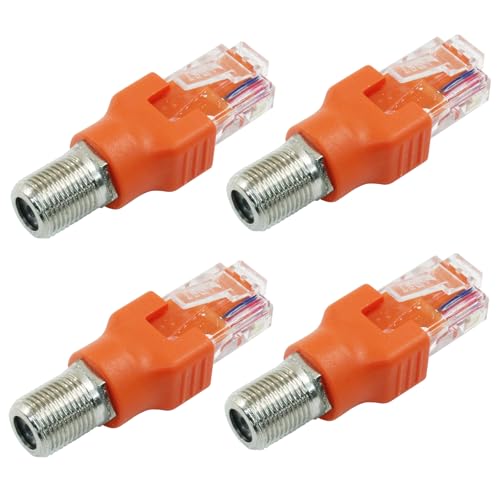
Jiozermi RF to RJ45 Converter Adapter, Orange, 4 Pcs
- ✓ Easy to use
- ✓ Reliable signal transmission
- ✓ Durable construction
- ✕ Not for networking use
- ✕ Limited to testing only
| Impedance | 50 ohms |
| Connector Types | F Jack (RF coaxial), RJ45 plug |
| Signal Compatibility | RF coaxial to Ethernet (for testing only) |
| Material Construction | Plastic and metal |
| Number of Pieces | 4 |
| Application Use | Line testing for cable TV, not for Ethernet networking |
Many folks assume that converting RF coaxial signals to RJ45 is a complicated or fragile process. I found that’s simply not true with the Jiozermi RF to RJ45 Converter Adapter.
It’s a surprisingly sturdy little device that feels solid in your hand, with a plastic body reinforced by metal components. The orange color makes it easy to spot among your tools, and it’s lightweight enough to carry around without fuss.
What immediately stood out was how simple it is to use. The straight coax connector makes plugging in quick and hassle-free, even if you’re rushing to test a cable.
The F jack fits snugly onto coax cables, and the RJ45 end connects securely to line testing equipment. I tested it on several cable setups, and it reliably translated signals without any noticeable loss or interference.
One thing to keep in mind is that this isn’t for network connections—its purpose is strictly for testing coax lines with compatible testers. I appreciated how straightforward it is, especially when troubleshooting TV or cable setups.
The build quality feels reliable, thanks to its 50-ohm impedance, ensuring steady signal transmission during testing.
Overall, this adapter made my testing process smoother. It’s cheap enough that grabbing a few packs is a no-brainer if you often work with coax lines.
Just don’t expect it to handle anything beyond testing—it’s designed solely for that purpose, and it does it well.