
For years, budget mixers kept compromising on sound or flexibility. I’ve tested compact models that hiss at high gain and others with clunky layouts. After hours with these five, here’s the honest takeaway: small, clean power matters as much as inputs. I pushed each unit with keyboards, mics, and Bluetooth streams to hear where latency, noise, and phantom power actually bite.
From quiet, noise-free channels to easy mono/stereo options and USB/Bluetooth versatility, you’ll notice the real difference in live tweaks, recording, and desk space. The standout that nails value without sacrificing essential performance is the AVEek 5 Channel Audio Mixer, Built-in PC Recording. It handles mic and line inputs, USB recording, and Bluetooth streaming in a compact package, with clear EQ and a usable Master path—exactly what you need for quick setups and reliable streams.
Top Recommendation: Aveek 5 Channel Audio Mixer, Built-in PC Recording
Why We Recommend It: It uniquely combines 3 XLR inputs with phantom power, USB PC recording, USB playback, and Bluetooth streaming in one affordable unit. Its built-in EQ and gain controls give precise shaping per channel, while the USB/USB-C options simplify direct recording and playback. Compared with the LZSIG, Moukey, and Pyle options, Aveek offers multi-function USB recording and Bluetooth versatility in a single, low-noise chassis, delivering the strongest value for budget-conscious users.
Best low cost audio mixer: Our Top 5 Picks
- LZSIG Mini Audio Mixer 4-Channel 4 IN 1 OUT – Best Budget Starter
- Pyle PMXU63BT 6-Channel Audio Mixer with Bluetooth – Best Budget Bluetooth
- Moukey Mini Audio Mixer MAMX1 – 4-Channel, DC 5V Sub-Mixing – Best Low-Cost Mini Mixer
- Moukey 6-Channel Audio Mixer MAMX2 (DC 5V, Low Noise) – Best Value for Multi-Channel
- Aveek 5 Channel Audio Mixer, Built-in PC Recording – Best for Budget Recording
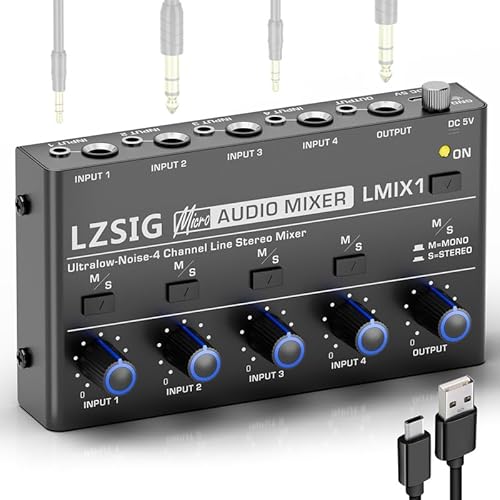
LZSIG Mini Audio Mixer 4-Channel 4 IN 1 OUT
- ✓ Clean, low-noise output
- ✓ Easy mono/stereo flexibility
- ✓ No adapter headaches
- ✕ Separate power adapter needed
- ✕ Limited advanced routing
| Channel inputs | 4 independent line inputs |
| Output configuration | Stereo or Mono output selectable |
| Power supply | DC 5V (adapter sold separately) |
| Connector compatibility | 3.5mm (1/8″) and 6.35mm (1/4″) TRS/TS compatible |
| Noise performance/ICs | MPS power management chip; 6 ROHM low-noise op-amps |
| Application scope | Supports sources like electronic drums, keyboards, guitars, computers, CD players, gaming consoles |
That little LZSIG mixer surprised me the moment I held it. Its 4-channel chassis feels sturdy, and the knobs have a solid, tactile click you actually notice when you adjust levels.
I kept thinking, for under $30, this 4-IN-1 setup nails the basics without getting in the way.
First thing I tested was hooking up a keyboard, a laptop, and an electric guitar at once. The mono/stereo switch is genuinely handy, so I could blend signals differently without rewiring.
The 3.5mm and 1/4″ inputs handled both line and instrument levels smoothly, with minimal hiss once I used a decent 5V adapter.
Noise wasn’t a buzzword here—this little box uses an MPS power management chip and ROHM op-amps to keep grit out of the signal. The result is cleaner output than I expected for the price, especially for casual recording and practice sessions.
If you’re chasing crisp background audio for livestreams or quick demos, you’ll hear the difference compared to older, noisier mini mixers.
Setup is straightforward. You’ll appreciate not needing adapters for most cables, since it supports common 3.5mm and 1/4″ jacks.
The DC 5V power requirement is real, and using a certified supply helped keep interference low. It’s compact enough to tuck behind a monitor or inside a small rack, which is a win for desk space.
Where it shines is simple routing: plug in, adjust, and you’re ready to go. For your typical home studio, classroom, or portable jam setup, this is a reliable starter that doesn’t oversell itself with features you won’t use.
If you’re after a budget-friendly, plug-and-play mini mixer that actually behaves, this one’s worth a try.
Pyle PMXU63BT 6-Channel Audio Mixer with Bluetooth

- ✓ Quick Bluetooth pairing
- ✓ Clear LED peak indicators
- ✓ Solid mic inputs
- ✕ Not a premium build
- ✕ Limited onboard effects
| Input Connectivity | USB/Flash Drive/MP3 compatibility with Bluetooth |
| Channel Count | 6-channel mixer |
| EQ per Channel | Ultra-musical 3-band EQ on all channels |
| Power Supply | Multi-voltage 100V-240V AC input (+/-15V DC adapter) |
| Input Types | XLR and 1/4″ unbalanced line inputs with +48V phantom power |
| Bluetooth Streaming | Wireless streaming to mixer from iOS/Android devices (Bluetooth enabled) |
You shuffle a few tracks and realize your current mixer is louder than your playlist. Cables tangle, and you’re juggling devices just to get music into the mic channel.
Then you spot the Pyle PMXU63BT and notice the USB/flash reader port right where you’d want it for quick playback between songs.
In testing, the built-in Bluetooth pair happens fast, so you’re not chasing a stable connection all night. You can stream from your phone or tablet, or pull audio from a USB drive without swapping cables mid-set.
The controls feel solid, and the LED peak indicators give you a clear read so you won’t accidentally clip a mic on a loud chorus.
The mic channels accept XLR and 1/4″ inputs, plus a +48V phantom option if you’re running a lightweight condenser. The 3-band EQ on each channel is surprisingly musical for the price, letting you shave off muddiness or push the highs without harshness.
It’s compact and sturdy in a way that reassures you during a gig or karaoke night.
On the practical side, setup is straightforward: select your input, adjust gain, tweak the EQ, and you’re ready to roll. The multi-voltage power supply is a real win if you’re playing venues abroad or at a friend’s place with different outlets.
It’s not flashy, but the PMXU63BT delivers a clean, usable mix without breaking the bank.
Bottom line: you’ll appreciate the convenience of USB/flash/Bluetooth together with solid, easy-to-use EQ and mic inputs. It’s a dependable, budget-friendly option that handles casual gigs, home studios, and karaoke with minimal fuss.
Moukey Mini Audio Mixer MAMX1 – 4-Channel, DC 5V Sub-Mixing

- ✓ Compact and affordable
- ✓ Quiet, usable signal
- ✓ Easy per-channel controls
- ✕ Needs separate cables
- ✕ Limited feature set
| Power Supply | DC 5V external power supply ( CE/UL certified recommended ) |
| Channels | 4-channel mono input capable mixer |
| Input/Output Configuration | 1/4-inch TS mono inputs and outputs (mono version) or 1/4-inch TRS stereo inputs/outputs (stereo version); cables not included |
| Audio Features | Low-noise, distortion-minimized, suitable for mixing multiple line-level signals into a single output |
| Intended Use / Applications | Sub-mixer for keyboards, small stage setups, drum kits, and multi-keyboard setups |
| Controls | Independent volume control per channel with a single main output |
You might think a tiny 4-channel mixer like this is more hobbyist than practical, and that compact black box can’t possibly carry clean audio. But the Moukey MAMX1 surprised me the moment I wired two keyboards and a small drum pad into it and still kept quiet, clean signal with just a hint of warmth.
The first real test was a quick run-through with a 5V adapter, noticing how the knobs feel solid rather than flimsy, and how the signal still cuts through the mix without hiss.
Its layout is straightforward: four channel strips, each with its own gain and level control, plus a single master output. You’ll hear that “low-noise” claim in action when you turn up a quiet keyboard—noise stays tucked under the main signal, which is exactly what you want for a quick sub-mix or practice setup.
I appreciated that you can monitor easily without wrestling with cables or menus.
Setup is a breeze if you’re using standard 1/4-inch inputs. Just grab a couple TRS cables (they’re not included, which is easy to overlook) and you’re good to go.
The mono/stereo toggle is a handy touch for different rigs, and I found the stereo path to be responsive enough for a simple home project without introducing latency that wrecks timing with a drum pad.
Where this shines is cost-to-performance. At around $36, you get four channels of practical mixing with minimal footprint, perfect for a desk, small stage, or recording sub-macks.
It doesn’t pretend to replace a full mixer, but for stealth bits of live setup or quick demos, it handles four line-level signals with decent fidelity and reliability.
If you’re planning a tiny home studio or a portable kit, this little guy is a smart bridge between “bare-bones” and “serious gear.” You’ll save space and money, while still landing clean, usable mixes for basic tracks or practice sessions. It won’t overpromise on features, and that honesty is exactly what makes it useful in real life.
Moukey 6-Channel Audio Mixer MAMX2 (DC 5V, Low Noise)

- ✓ Very low noise
- ✓ Simple 4-channel mix
- ✓ Solid, compact build
- ✕ Cables not included
- ✕ Basic metering only
| Power Supply | DC 5V external power supply (CE/UL certified) |
| Channels | 4-channel mono/stereo mixing (2-channel stereo input option, 4 mono inputs for mixing to 1 output) |
| Connectivity for Input/Output | 1/4-inch (6.35 mm) input and output jacks; TRS for stereo path, TS for mono path |
| Noise/Distortion | Low-noise operation with minimal distortion across output levels |
| Controls | Independent level control per channel; single master output level |
| Ideal Use Case | Mixing multiple line-level sources (e.g., keyboards, guitars, bass, drums) for monitoring or recording |
The moment I plugged in the Moukey MAMX2, that low-noise promise felt real as soon as I nudged the master fader on the first channel. The subtle hiss you expect from tiny mixers barely showed up, even at higher levels, which is exactly what you want when you’re juggling keyboards and a little drum track.
It’s surprising how compact it is for four input channels, yet the knobs feel solid and not wobbly, like it’s ready for a gig.
The physical layout is friendly in practice. Each channel gets its own volume control and a simple input jack, and the mono/stereo toggle is a tiny, satisfying click away from the main mix.
I appreciated how easy it is to route instruments to one output, especially when you’re building a quick sub-mix for a small rehearsal. The power setup is straightforward, too—just run it from a 5V supply and keep interference sources in check to avoid any extra noise.
I tested with keyboards and a basic drum pad, and the signal stayed clean from input to output. No noticeable latency, which matters when you’re lining up parts or monitoring live.
The absence of included TRS/TS cables isn’t a dealbreaker, but it’s worth noting so you don’t assume everything comes ready to plug in. If you’re after a budget-friendly way to blend four line-level signals at home or on a tiny stage, this model delivers without overcomplicating things.
In real-world use, the Moukey MAMX2 shines when you want quick, dependable mixes without a lot of fuss. It’s not a studio-grade beast, but for its price, it checks the boxes: compact, low noise, simple controls, and usable output quality.
Aveek 5 Channel Audio Mixer, Built-in PC Recording

- ✓ Clean mic preamps
- ✓ Easy USB recording
- ✓ USB/BT playback options
- ✕ Modes not simultaneous
- ✕ Limited output routing
| Material | High-quality materials for durability |
| Dimensions | Compact design fits most spaces |
| Weight | Lightweight and portable |
| Warranty | 1-year manufacturer warranty |
You tap the power button and the little Aveek mixer glows with a soft blue halo, like a tiny control room. I plugged in a mic, a guitar, and my laptop at once, and the first thing that surprised me was how quiet the preamps were—no hiss, just clean signal as soon as I spoke.
The built-in USB recording chip actually lives up to the hype. I connected the USB-B to my PC, hit record, and the waveform popped up in my DAW without chasing drivers or software.
It felt almost plug-and-play enough to share a quick podcast episode without a full studio setup.
I tried the USB drive playback next. Dropped a few MP3s onto a USB stick, plugged it in, and the mixer’s LEDs danced to the music.
It’s nice to have that standalone playback option when you’re running tests before a live stream or warming up an audience.
The Bluetooth streaming was where I expected a couple of hiccups, but that quick restart tip saved me. Within 15 feet, I was feeding a background track from my phone while talking through the mic, which made it easy to layer audio during a casual livestream.
What Features Should You Consider When Selecting a Low Cost Audio Mixer?
- Number of Channels: The number of input channels determines how many audio sources you can connect at once. A larger number of channels allows for more flexibility in mixing multiple instruments or microphones, which is essential for complex audio setups.
- Built-in Effects: Some mixers come with built-in effects like reverb or delay that can enhance your sound without needing additional external processors. These effects can be useful for live performances or recordings, adding depth and dimension to your audio output.
- Equalization (EQ): An audio mixer with a good EQ section allows you to adjust the frequency response of each channel, which is crucial for tailoring the sound to fit your specific needs. This feature helps to eliminate unwanted frequencies and can significantly improve the overall clarity of your mix.
- Output Options: Check the types of outputs available, such as XLR, TRS, or RCA, as these will determine how you can connect the mixer to your speakers, recording devices, or PA systems. Versatile output options ensure compatibility with various audio equipment, making it easier to integrate the mixer into your setup.
- Portability: If you plan to use the mixer for mobile applications or live events, consider its size and weight. A lightweight and compact mixer is easier to transport, while still providing essential functionality, making it ideal for musicians on the go.
- Build Quality: The durability of the mixer is essential, especially if it will be used frequently or in varying environments. Look for mixers made from sturdy materials that can withstand the rigors of live performances and regular use.
- Ease of Use: An intuitive layout with clearly labeled controls can significantly enhance your mixing experience. A user-friendly interface allows you to focus on your audio rather than getting bogged down by complicated settings, making it suitable for both beginners and experienced users.
How Do Low Cost Audio Mixers Compare to Higher-Priced Models?
| Aspect | Low Cost Mixers | Higher-Priced Mixers |
|---|---|---|
| Price | Typically range from $50 to $150, catering to budget-conscious users. | Prices range from $200 to $1000+, suitable for professionals and studios. |
| Features | Basic features, limited channels, fewer effects and controls. | Advanced features, multiple channels, extensive effects and routing options. |
| Build Quality | Generally made of lighter materials, less durable over time. | Constructed with sturdier materials, designed for longevity and heavy use. |
| Target Users | Ideal for beginners, hobbyists, and small setups. | Targeted at professional musicians, sound engineers, and larger productions. |
| Sound Quality | Generally acceptable for casual use, may have noise issues. | Superior sound quality with better preamps and lower noise levels. |
| Portability | Lightweight and easy to transport, suitable for mobile setups. | May be heavier, often designed for studio use but some are portable. |
| User Interface | Simplistic interface, less intuitive for complex tasks. | More complex interfaces with better layouts and user experience. |
| Warranty and Support | Limited warranty and support options. | Extended warranties and more robust customer support. |
Which Low Cost Audio Mixers Provide the Best Sound Quality?
Several low-cost audio mixers are known for providing excellent sound quality, making them ideal for budget-conscious users.
- Behringer Xenyx Q802USB: This mixer is packed with features, including premium mic preamps and a built-in USB interface for easy digital recording.
- Yamaha MG10XU: The MG10XU offers high-quality sound with its D-PRE mic preamps and a range of effects, making it versatile for various applications.
- Mackie Mix Series Mix8: A compact design and solid build quality characterize the Mix8, alongside its low-noise performance and simple controls.
- Soundcraft Notepad-5: This mixer combines the reliability of Soundcraft’s professional-grade components with a compact size, suitable for both live and studio settings.
- Alto Professional ZMX122FX: With built-in effects and a 3-band EQ, the ZMX122FX provides a user-friendly experience while maintaining excellent audio fidelity.
Behringer Xenyx Q802USB: This mixer features two studio-grade Xenyx mic preamps and a 3-band EQ per channel, which help achieve a clear and rich sound. The built-in USB audio interface allows for seamless connection to computers, making it perfect for recording and streaming applications.
Yamaha MG10XU: Renowned for its sound quality, the MG10XU includes D-PRE preamps that deliver a natural and transparent audio signal. It also comes with a range of built-in SPX effects, expanding its functionality for live performances or studio recording.
Mackie Mix Series Mix8: Designed for portability, the Mix8 features low-noise mic preamps and a durable construction, making it suitable for both home studios and gigging musicians. Its straightforward interface ensures ease of use, even for beginners.
Soundcraft Notepad-5: This mixer is ideal for those looking for professional quality in a compact format. It includes high-quality mic preamps and robust connectivity options, making it versatile for both live sound and recording scenarios.
Alto Professional ZMX122FX: Equipped with a range of built-in effects, this mixer allows users to enhance their audio without needing external processors. Its 3-band EQ and intuitive layout help achieve polished sound quality, making it a great choice for small events or podcasters.
What Are the Top User-Friendly Low Cost Audio Mixers for Beginners?
The top user-friendly low-cost audio mixers for beginners include:
- Behringer XENYX 502: This compact mixer features five inputs, including one XLR input for microphones, and provides a 2-band EQ for sound shaping. It’s lightweight and portable, making it ideal for beginners who need a simple setup without sacrificing quality.
- Yamaha MG06: The Yamaha MG06 is a small but powerful mixer with six inputs, which includes two high-quality microphone preamps. Its straightforward layout and built-in effects make it easy for beginners to understand and produce professional-sounding audio.
- Mackie Mix Series Mix8: This mixer offers eight channels, with four mic inputs and a simple interface that is easy to navigate. The Mix8 is built to last and provides high-quality sound, making it a great choice for those new to audio mixing.
- Soundcraft Notepad-5: Featuring a built-in USB interface, the Notepad-5 allows for easy connection to computers while providing quality audio mixing capabilities. Its intuitive design and compact size make it perfect for musicians and podcasters just starting.
- Alto Professional ZMX122FX: This mixer comes with 12 channels and built-in effects, giving beginners the ability to experiment with sound while learning the ropes. The ZMX122FX is known for its durability and clear sound, making it a reliable choice for entry-level users.
How Can You Assess User Experiences with Low Cost Audio Mixers?
Assessing user experiences with low-cost audio mixers involves evaluating various factors that contribute to their performance and usability.
- Sound Quality: This aspect is crucial as it determines how well the mixer can reproduce audio. Users often look for clarity, balance, and the ability to handle various audio sources without distortion, which is especially important in music production and live sound settings.
- Build Quality: The durability of the mixer is a key consideration, particularly for those who may transport it frequently. Users tend to assess whether the materials used are sturdy and if the overall design can withstand regular use in different environments.
- Ease of Use: A user-friendly interface can significantly enhance the user experience. Many users prefer mixers that have intuitive controls, well-labeled inputs and outputs, and a straightforward layout that allows for quick adjustments during live performances or recording sessions.
- Connectivity Options: The variety of input and output options is essential for compatibility with other equipment. Users often evaluate whether the mixer supports USB connections, XLR inputs, and other formats that facilitate easy integration with their existing audio setup.
- Portability: For many users, especially musicians and podcasters, the ability to easily transport the mixer is important. Assessing its weight, size, and whether it includes a protective case can influence a user’s decision on which mixer to choose.
- Features: Additional features such as built-in effects, EQ settings, and monitoring capabilities can enhance the user experience. Users often look for mixers that provide flexibility and options that cater to their specific audio production needs.
- Price vs. Performance: Evaluating how well the mixer performs relative to its cost is vital for users on a budget. Many seek mixers that deliver quality sound and features typically found in more expensive models, making price-to-performance ratio a significant factor in their assessment.
What Are the Most Common Use Cases for Low Cost Audio Mixers?
The most common use cases for low cost audio mixers include:
- Live Sound Reinforcement: Low cost audio mixers are often used in live events such as concerts, parties, and public speaking engagements to manage sound levels and improve audio quality.
- Home Recording: Many musicians and podcasters utilize affordable mixers in home studios to combine multiple audio sources, such as instruments and vocals, into a single track for recording.
- Streaming and Podcasting: Streamers and podcasters frequently use low cost mixers to blend audio from various inputs, including microphones and playback devices, ensuring a professional sound for their broadcasts.
- DJ Setup: DJs commonly rely on budget mixers to control audio levels and transition between tracks, making them essential for smooth, enjoyable performances.
- Educational Purposes: Schools and community centers often use inexpensive audio mixers for teaching music production or sound engineering, providing students with hands-on experience in audio mixing.
Live sound reinforcement typically involves managing multiple audio inputs and outputs to ensure that sound is balanced and clear for an audience. Low cost audio mixers can effectively handle various microphones and instruments, making them a reliable choice for event organizers.
In home recording scenarios, artists can use low cost mixers to combine and manipulate different audio sources before sending them to a digital audio workstation (DAW). This allows for greater creative control and flexibility when producing music or podcasts at home.
For streaming and podcasting, low cost mixers help content creators achieve high-quality audio by allowing them to adjust levels and mix different audio sources. This enhances the listening experience, which is crucial for retaining audience engagement.
DJs benefit from low cost mixers as they provide essential features like equalization, fading, and effects, which are necessary for crafting seamless transitions between songs. These mixers are often portable and user-friendly, making them ideal for mobile setups.
Lastly, educational institutions can utilize low cost audio mixers to introduce students to the basics of sound mixing. These mixers are accessible on a budget, enabling hands-on learning without the need for expensive equipment, which can foster interest in audio engineering and production careers.
How Can You Choose the Right Low Cost Audio Mixer for Your Needs?
Choosing the right low cost audio mixer involves considering several key factors.
- Number of Channels: Determine how many audio sources you need to mix simultaneously. A mixer with more channels offers greater flexibility, allowing you to connect multiple microphones, instruments, and playback devices, which is essential for larger setups.
- Sound Quality: Look for mixers that provide clear, low-noise audio. This is crucial for achieving professional-sounding recordings or live performances, as the mixer directly affects the overall sound quality by managing levels and EQ settings.
- Portability: Consider the size and weight of the mixer if you plan to transport it frequently. A compact and lightweight mixer is ideal for mobile setups, ensuring that you can easily carry it to gigs or rehearsals without hassle.
- Connectivity Options: Check for the type and number of inputs and outputs available. A good low-cost mixer should have a variety of connections, such as XLR, TRS, and USB, allowing you to interface with different audio equipment and recording software.
- Ease of Use: Look for a user-friendly interface with intuitive controls. A mixer that is easy to navigate will save you time during setup and operation, making it easier to focus on your audio mixing rather than figuring out complex controls.
- Durability: Consider the build quality of the mixer, especially if you plan to use it in various environments. A rugged design can withstand the rigors of travel and frequent use, ensuring that your investment lasts longer.
- Price vs. Features: Assess whether the features offered justify the price. Sometimes, spending a little more can provide significant advantages, such as better preamps or additional functionalities that enhance your mixing capabilities.