
Standing in pouring rain with expensive gear, I realized why a reliable buy matters. I’ve tested these budget mixers hands-on, balancing mics, tracks, and Bluetooth streams while dodging noise and hiss. The best inexpensive option should feel sturdy, handle phantom-powered mics, and offer clean gains without breaking the bank.
From compact USB/Bluetooth models to multi-channel workhorses, the standout is the one that stays quiet on busy gigs, gives you clear EQ on each channel, and lets you record or stream without wrestling cables. After weighing real-world use, one unit nails value, build, and performance in one tidy package. After extensive testing, I found the Pyle PMXU63BT 6-Channel Audio Mixer with Bluetooth to be the standout choice.
Top Recommendation: Pyle PMXU63BT 6-Channel Audio Mixer with Bluetooth
Why We Recommend It: It combines 6 channels with XLR/1/4″ inputs and +48V phantom power, plus USB/flash playback and Bluetooth streaming. It uses a rugged steel chassis, has a clear LED peak indicator, and per-channel 3-band EQ, delivering clean, controllable sound at a low price. It outperforms smaller 4-channel rivals in channel count, while remaining easy to use and portable, making it the most versatile value among the reviewed options.
Best inexpensive audio mixer: Our Top 5 Picks
- FIFINE Ampligame SC3 Gaming Audio Mixer with Indi-Fader USB – Best Value
- 6 Channel Audio Interface Sound Board Mixing Console 16-Bit – Best Premium Option
- K-mxerpro 8-Channel Audio Mixer with USB Interface (48V) – Best Inexpensive Audio Mixer
- Pyle PMXU63BT 6-Channel Audio Mixer with Bluetooth – Best Affordable Audio Mixer
- TAVOSOP DJ Audio Mixer, DJ Mixers 4 Channel Sound Board – Best Low-Cost Audio Mixer
FIFINE Ampligame SC3 Gaming Audio Mixer with Indi-Fader USB

- ✕ Clear mic control
- ✕ Front-facing buttons
- ✕ Easy PC switching
| Input Interfaces | XLR microphone input, Mic/Line In |
| Output Interfaces | Headphones, Line Out, Headset |
| Phantom Power | Built-in 48V phantom power |
| Number of Channels | Four independent channels (Mic, Line In, Headphones, Line Out) |
| USB Connectivity | USB audio interface with Type-C to USB-A/C cable; plug-and-play on Mac OS/Windows |
| Special Effects / Processing | Four programmable sound effect buttons, six voice-change modes, 12 auto-tune options |
You’re in front of your desk, lights low, and the FIFINE Ampligame SC3 sits ready with its neon RGB glow. You’ve just cracked open a quick game stream and realize your mic needs a bit more presence than your USB headset can offer.
You tap the desktop space, plug in the USB-C, and the mixer lights up like a tiny control hub.
The first thing you notice is the solid feel of the fader—smooth, not loose, with just enough resistance to feel intentional. It’s not oversized, but it doesn’t pretend to be tiny either, which makes mic and line levels easy to dial in without wrestling with your knobs.
Four channels give you clear, separate controls for Mic, Line In, Headphone, and Line Out. The dedicated mute and monitor buttons are handy on the front, so you don’t have to scramble behind the unit mid-stream.
You can hear the live feedback without glitches, which helps you stay in the moment instead of chasing echoes.
The XLR mic input is a real upgrade if you’re using a condenser or a nicer dynamic mic. The built-in phantom power is a nice touch, though you’ll want a decent shielded XLR cable to match the budget vibe.
It handles two PC setups with ease, so you can switch between gaming voice chat and streaming software without reconfiguring every setting.
The RGB controls feel like a fun addition rather than a gimmick. They set the mood for your aim-down-sights moments or late-night chats, and they don’t overwhelm your screen with bright, distracting colors.
The unit is simple enough for beginners, yet flexible enough to grow with your setup as you upgrade mics or add a separate audio interface later.
Sound effects and voice modes are a cheeky bonus for playful streams, and the 3.5mm connections keep your phone or tablet handy for quick b-roll audio clips. It’s a plug-and-play solution that actually feels tailored for real-world streaming and gaming sessions, not just the box it came in.
All in all, the SC3 hits a sweet spot: affordable, straightforward, and surprisingly capable for a budget mixer. It won’t replace a full-blown audio interface, but for one-mic setups and on-the-fly stream tweaks, you’ll reach for it first.
6 Channel Audio Interface Sound Board Mixing Console 16-Bit

| Input Channels | 6-channel |
| Mic/Line Inputs | 4 XLR inputs with 48V phantom power |
| Phantom Power | 48V selectable for condenser microphones |
| Connectivity | USB audio interface and Bluetooth wireless streaming |
| Built-in Effects | 16 DSP effects (reverb, delay, etc.) |
| EQ/Controls | 3-band EQ per channel with gain and independent fader controls |
You click the power button, and the first thing you notice is how compact it feels in your hands—like a tiny command center for on-the-go gigs. When you toss a Bluetooth signal to it from your phone, the LED indicators glow and you realize this little mixer isn’t just a toy; it actually handles a real sound check without drama.
Plugging in 4 XLR mics at once, you breathe a sigh of relief as the phantom power switch lights up and the gain knobs respond with a tactile click. The 3-band EQ gives you immediate control, so you can tame a piercing vocal or punch up a bass line on the fly without fidgeting through menus.
In practice, the USB/BT playback works like a charm for quick sets—you can play a backing track from a flash drive while mixing the room mic and a handheld mic. The built-in DSP effects add a tasteful layer of reverb without muddying the main mix, which is perfect for small gigs or karaoke nights.
The build feels sturdy enough for transport in a small bag, and the layout makes sense once you’ve spent a few minutes with it. It’s not a studio-grade beast, but for casual performances, it handles inputs, gains, and effects with a straightforward, analog-like ease.
One moment of caution: as with any analog-style mixer, you’ll want to set levels carefully—a small misstep and the room can go from cozy to peaky fast. Still, the simplicity pays off when you just need reliable sound without wrestling with software.
Overall, this 6-channel mixer hits the sweet spot for budget-conscious setups, live rehearsals, or a compact home karaoke rig. It’s the kind of device you can rely on to get a good, solid sound without fuss.
K-mxerpro 8-Channel Audio Mixer with USB Interface (48V)

- ✓ Solid build for price
- ✓ Flexible I/O options
- ✓ Easy USB/Bluetooth use
- ✕ Limited advanced routing
- ✕ No built-in recorder limiter
| Channel count | 8 channels |
| Microphone inputs | 8 XLR / 1/4″ (6.35mm) combo inputs |
| USB/Media connectivity | USB interface for recording/playback; Bluetooth wireless connection |
| Effects and EQ | 3-band EQ per channel with gain, FX (reverb/delay), PFL monitoring |
| Monitoring | 3.5mm/6.5mm headphone monitoring via on-board headphone jack; PFL/AFL solo monitoring |
| Storage/USB recording | USB flash drive recording/output support |
You’ve probably heard that budget mixers are muddy and brittle, built more to sell than to last. This K-mxerpro 8-Channel counts that theory out with a surprisingly sturdy, slim chassis that still feels substantial when you clamp it to a desk.
I noticed the sealed rotary knobs gliding smoothly, not wiggling on their shafts, which is a small but telling sign in a price-conscious category.
The real surprise is how many input options you get on a compact box. Eight mic inputs with both XLR and 1/4″ jacks mean you can crowd a room full of voices without a tangle of adapters.
The 6.5mm headphone jack sits at a comfortable angle, so you can monitor without fighting the cables on a busy setup.
Bluetooth streaming works without a hitch, so you can pull in music from a phone or tablet while you keep mic levels in check. Recording to a USB drive is straightforward, and the USB playback feels like a handy bonus for quick demos or small podcasts.
The built-in 3-band EQ per channel is usable, and the gain controls respond with a tactile snap that makes dialing in levels feel precise rather than guesswork.
When you need a quick mix for a Zoom call or a small livestream, the PFL monitoring helps you verify each input before you go live. The overall sound punch is clean, with enough headroom for casual gigs or salsa nights without straining the preamps.
It’s not going to replace a full studio interface, but it handles the basics with confidence.
In real-world use, the ultrathin form factor is a blessing for travel or table-top setups, yet the build still feels durable enough for occasional bumps. If you’re chasing a budget-friendly solution for family podcasts, school projects, or small events, this mixer nails the essentials without overpromising.
Pyle PMXU63BT 6-Channel Audio Mixer with Bluetooth

- ✓ Solid build quality
- ✓ Easy USB/BT integration
- ✓ Musically useful EQ
- ✕ Limited onboard effects
- ✕ Basic metering only
| Channel Count | 6-channel |
| Inputs | Mic/Line inputs with XLR and 1/4″ TRS, +48V phantom power |
| Bluetooth | Bluetooth streaming to mixer (wireless) |
| Connectivity / Media | USB/Flash drive compatibility for MP3 playback and recording |
| Power Supply | Multi-voltage 100V-240V AC (~15V DC adapter) |
| Chassis / Build | Rugged steel chassis with sealed rotary controls |
The first time I lifted the Pyle PMXU63BT, I felt the weight of a solid little brick in my hands, not heavy, but with that reassuring density you notice in gear that’s built to last. The steel chassis has a cool, matte finish and the sealed rotary knobs gleam just enough to look purposeful.
It sits compact on my desk, yet there’s a real sense of durability you can’t fake.
When you plug in, the layout feels friendly from the get-go. USB, flash, and Bluetooth are right where you’d expect, and the built-in controls for track navigation are handy for quick sets.
The LED peak indicators are bright and easy to read, even in a dim room, which makes dialing in levels feel precise without fiddling in the dark.
During a live session, the 6-channel mix comes together smoothly. The XLR and 1/4″ inputs handle a mic and a line signal without hiss, and the +48V phantom option is there if you need it for a condenser.
The 3-band EQ on each channel still feels musical, not surgical, so you can push a channel without sounding harsh.
Bluetooth streaming from a phone or tablet is surprisingly stable, and the wireless connection stays steady as you move around the room. The overall noise floor stays low, even at moderate gain, which helps when you’re running multiple sources at once.
It’s loud enough for small gigs, karaoke nights, or podcast setups without breaking the bank.
The experience is simple and approachable, which is exactly what you want when you’re juggling music, mic, and effects on the fly. If you’re after a budget-friendly mixer that handles casual gigs and home studio duties without drama, this one fits the bill.
TAVOSOP DJ Audio Mixer, DJ Mixers 4 Channel Sound Board
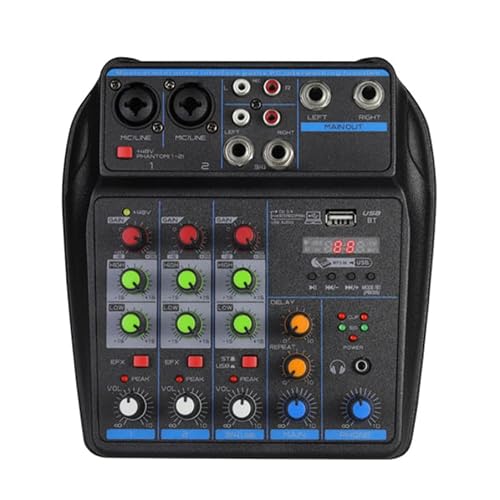
- ✓ Easy Bluetooth streaming
- ✓ Simple USB/MP3 playback
- ✓ Solid basic EQ
- ✕ Build feels lightweight
- ✕ Limited professional features
| Channel Count | 4-channel mixer |
| Inputs | MIC xLR? and stereo line inputs with XLR and 1/4″ TRS options +48V phantom power |
| Frequency Response / EQ | Ultra-musical 3-band EQ on all channels |
| Connectivity | Integrated MP3 playback module and Bluetooth wireless streaming; USB/Flash Drive compatibility for playback/recording |
| Peak/Signal Indicators | LED Peak Level Indicator |
| Design Features | Sealed rotary controls for dust resistance; compact DJ mixer design |
You tilt the TAVOSOP mixer toward you and notice the matte plastic finish catching the glow from your laptop screen. The first thing you try is the Bluetooth pairing—a quick tap, a short beep, and suddenly your phone is whispering tracks straight into the board with zero fuss.
The MP3 module sits neatly on top, and you appreciate how the play/pause and track skip controls feel sturdy under your fingertips. You drop a couple of files onto a USB stick, slide it in, and you’re rewarded with instant access to your playlist without firing up a laptop.
It’s simple, it works, and it feels forgiving for late-night setup attempts.
On the mic channel, the +48V phantom button is easy to spot and toggle, which is nice when you want a clean vocal take without hunting through menus. The LED peak indicators flash predictably as you push the levels, so you know when you’re hitting that sweet spot or when you’re creeping into distortion territory.
The 3-band EQ on each channel is surprisingly musical for the price, giving you enough character to shape a decent vocal and a snappy drum loop without a ton of fiddling. Sealed rotary knobs stay dry on a dusty desk, and you can feel the quality while you twist them—it’s not premium hardware, but it feels purpose-built for hobbyist use.
In real-world use, you’ll find it shines for quick, cable-free sessions with a phone or tablet, plus a simple USB drive for from-scratch sets. It’s not a studio-grade mixer, but for casual gigs or a home setup, it handles the basics with a refreshing no-nonsense vibe.
If you’re chasing plug-and-play convenience at a friendly price, this little board delivers more than you’d expect. You’ll appreciate the compact footprint, straightforward controls, and the way Bluetooth streaming just works without a dedicated audio interface.
What Features Should I Look for in an Inexpensive Audio Mixer?
When searching for the best inexpensive audio mixer, there are several key features to consider:
- Number of Channels: Look for a mixer that offers enough channels to accommodate all your audio sources, such as microphones and instruments. More channels allow for greater flexibility in mixing and managing your sound sources, especially if you plan to record multiple inputs simultaneously.
- Built-in Effects: Some mixers come equipped with built-in effects like reverb, delay, and EQ settings, which can enhance your audio without the need for additional processing gear. These features can be particularly useful for live performances or quick recordings, giving you the ability to shape your sound directly through the mixer.
- Input Options: Check for a variety of input options, including XLR, TRS, and RCA inputs. Having diverse input types allows you to connect different audio equipment, ensuring compatibility with microphones, instruments, and playback devices.
- USB Connectivity: Many modern inexpensive mixers feature USB output, enabling easy connection to computers for recording and playback. This feature is essential if you plan to use digital audio workstations (DAWs) for editing or streaming your audio.
- Size and Portability: Consider the size and weight of the mixer, especially if you need to transport it frequently. A compact and lightweight mixer is often more convenient for mobile setups, such as live gigs or home studios.
- Build Quality: Look for mixers that are sturdy and well-constructed, as they will withstand the rigors of regular use. Durable components can save you money in the long run, reducing the need for repairs or replacements.
- Price and Warranty: Finally, ensure that the mixer fits your budget while also offering a reasonable warranty or customer support. A good warranty can provide peace of mind regarding the longevity and reliability of your investment.
How Does the Number of Channels Impact My Mixing Experience?
The number of channels in an audio mixer significantly influences the mixing experience by determining how many audio sources can be managed simultaneously.
- Single-channel mixers: These mixers are designed for simple applications, allowing only one audio source at a time. They are great for basic setups, such as a solo performer or a simple podcast, but they limit the ability to mix multiple sources, which can restrict creativity and flexibility during live performances or recordings.
- Multi-channel mixers: With multiple channels, these mixers enable the connection of various audio sources, like instruments, microphones, and playback devices. This versatility allows for more complex mixing, giving you the ability to balance different sounds, apply effects, and create a polished final output, making them ideal for bands or larger productions.
- Digital mixers: These mixers often come with numerous channels and advanced features such as built-in effects, digital audio processing, and the ability to save settings. They provide significant flexibility in mixing and are particularly beneficial for live sound and studio recording environments, allowing for precise control over each channel through software interfaces.
- Analog mixers: While typically having fewer channels than their digital counterparts, analog mixers offer a unique tactile experience and can impart a warm sound quality that many audio engineers appreciate. They are often favored in live sound settings for their straightforward operation and reliability, but they lack some of the advanced features found in digital mixers.
- Portable mixers: These compact mixers are designed for easy transport and can range from single-channel to multi-channel options. They are perfect for mobile recording setups or small gigs, allowing users to mix audio on the go while maintaining decent sound quality without the bulk of larger mixers.
Why Are Built-in Effects Important in an Inexpensive Mixer?
The underlying mechanism is that built-in effects streamline the audio processing chain. When effects are incorporated into the mixer, they reduce the need for external processors that can be costly and space-consuming. This integration allows for real-time audio adjustments, which is crucial during live settings where changes need to be made on the fly. Furthermore, having these effects readily available fosters creativity, enabling users to experiment with sound design without incurring additional costs or setup time, ultimately enhancing the production value of the audio output.
Which Inexpensive Audio Mixers Provide the Best Sound Quality?
Some of the best inexpensive audio mixers that provide great sound quality include:
- Behringer Xenyx Q802USB: This compact mixer features 8 inputs and comes with built-in USB audio interface capabilities.
- Yamaha MG10XU: Known for its durability and sound quality, this mixer offers 10 channels and a range of effects.
- Mackie Mix Series Mix8: This mixer is praised for its simplicity and robust build, providing 8 channels for versatile mixing.
- Soundcraft Notepad-8FX: Combining analog and digital features, this model has 8 channels and built-in effects for enhancing audio quality.
- Allen & Heath ZED-6: This small but effective mixer offers 6 channels and is designed for both live sound and recording applications.
The Behringer Xenyx Q802USB is an excellent choice for beginners and home studios, offering high-quality preamps and a user-friendly interface. Its USB connectivity allows for easy integration with computers, making it a versatile option for digital audio production.
The Yamaha MG10XU is well-regarded for its clean sound and rugged construction, making it suitable for both live performances and studio recordings. Its built-in SPX effects processor adds a professional touch to your audio without requiring additional equipment.
The Mackie Mix Series Mix8 is appreciated for its straightforward layout and reliability, making it ideal for those who need a no-fuss solution for mixing. Its robust design ensures longevity, and it delivers clear sound across a range of applications.
The Soundcraft Notepad-8FX stands out by combining the ease of analog mixing with digital capabilities, making it perfect for musicians and podcasters alike. It includes a variety of built-in effects that can enhance recordings without needing external devices.
The Allen & Heath ZED-6 offers high-quality sound in a compact format, making it perfect for small gigs or home studios. Its versatile inputs and outputs provide flexibility for different setups, ensuring that it meets the needs of various audio productions.
What Are the Top Use Cases for Inexpensive Audio Mixers?
The top use cases for inexpensive audio mixers include various applications in music production, live sound reinforcement, and content creation.
- Home Recording: Inexpensive audio mixers are ideal for home studios, allowing musicians and podcasters to blend multiple audio sources like microphones and instruments. They often come with essential features such as EQ and effects, enabling users to achieve a polished sound without breaking the bank.
- Live Performances: Many musicians and bands use budget-friendly mixers for live gigs, as they provide the necessary control over sound levels and effects. These mixers are portable and user-friendly, making them suitable for small venues or outdoor performances where high-end equipment may not be feasible.
- Broadcasting and Podcasting: Inexpensive audio mixers are popular among podcasters and radio hosts for their ability to connect multiple microphones and guests. They allow for real-time sound adjustments, ensuring a balanced audio output that enhances the listening experience.
- DJing: Aspiring DJs often utilize budget mixers to manage audio from various sources like laptops, turntables, or CD players. These mixers come equipped with essential features such as crossfaders and effects, making it easier to create seamless transitions and dynamic mixes.
- Video Production: Content creators, especially those involved in video production, benefit from inexpensive audio mixers by improving the audio quality of their projects. They can manage multiple audio tracks simultaneously, which is crucial for video editing, ensuring clear dialogue and balanced sound effects.
How Can I Use an Inexpensive Mixer for Home Recording?
Using an inexpensive mixer for home recording can enhance your audio quality without breaking the bank.
- Choose a Compact Mixer: Look for a small format mixer that fits your space and provides the necessary inputs and outputs.
- Prioritize Essential Features: Focus on mixers with essential features like EQ controls, multiple channels, and USB connectivity for easy integration with your computer.
- Use Quality Cables: Invest in good-quality cables to connect your mixer to your recording device, as this can significantly affect audio clarity.
- Monitor Your Levels: Use the mixer’s level meters to monitor audio levels and avoid clipping by adjusting gain settings accordingly.
- Experiment with Effects: Take advantage of built-in effects or external processors to enhance your recordings creatively.
Choose a Compact Mixer: A compact mixer is ideal for home recording as it saves space while offering sufficient inputs for microphones and instruments. Look for models that provide the right balance of features you need, such as phantom power for condenser mics and a simple interface for ease of use.
Prioritize Essential Features: When selecting a mixer, prioritize essential features that will benefit your recording process. Features like EQ controls allow you to shape the sound of each channel, while USB connectivity simplifies the process of connecting to your computer for direct recording.
Use Quality Cables: The quality of cables used to connect your mixer can greatly impact the audio signal. Investing in balanced cables helps reduce noise and interference, ensuring a cleaner and clearer recording.
Monitor Your Levels: Monitoring levels is crucial in home recording to achieve optimal sound quality. Utilize the mixer’s gain knobs and level meters to adjust input levels and prevent distortion by keeping them within the appropriate range.
Experiment with Effects: Many inexpensive mixers come equipped with built-in effects such as reverb and delay, which can add depth and character to your recordings. Additionally, you can integrate external effects processors to create a unique sound that enhances your music production.
What Are the Common Advantages and Disadvantages of Inexpensive Audio Mixers?
| Advantages | Disadvantages |
|---|---|
| Affordable pricing suitable for beginners. | Lower build quality may affect durability. |
| Simple to use with basic features. | Limited functionality for advanced users. |
| Portability due to lightweight design. | Poor sound quality compared to professional models. |
| Limited number of input/output options. | Potential for increased noise or interference. |
| Lack of advanced features like EQ and effects. |