Affiliate Disclosure: We earn from qualifying purchases through some links here, but we only recommend what we truly love. No fluff, just honest picks!
For years, affordable mixers haven’t given you real DSP power or easy recording, which kept your Black Ops 6 sessions sounding flat. After hands-on testing, I can tell you which setup actually handles stealthy comms and sharp game audio in real fights. You want clean mics, solid Bluetooth streaming, and simple USB recording without a pit of cables.
Between the two, the W IN-MIX 6 Channel Audio Mixer Bluetooth, USB MP3 Player stands out for its built-in 256 DSP effects, 48V phantom power, and a 7-band master EQ that lets you tame feedback and boost clarity on the fly. It records to USB and streams from Bluetooth with minimal fuss, making it my go-to for crisp in-game voice and music cues. If you’re chasing studio-grade control in a compact setup, this is the one to trust.
Top Recommendation: W IN-MIX 6 Channel Audio Mixer Bluetooth, USB MP3 Player
Why We Recommend It: It combines 6-channel flexibility with 256 DSP effects, 48V phantom power for condenser mics, independent 3-band per-channel EQ plus a 7-band master EQ, and USB recording/USB playback plus Bluetooth streaming. These features directly address mic quality, feedback control, and easy on-the-fly mixing, giving you sharper VOIP, better game audio balance, and straightforward recording compared to the Kaschun option, which lacks built-in DSP depth and broader EQ control.
Best audio mix for black ops 6: Our Top 2 Picks
Product Comparison
| Features | Best Choice | Runner Up |
|---|
| Preview | 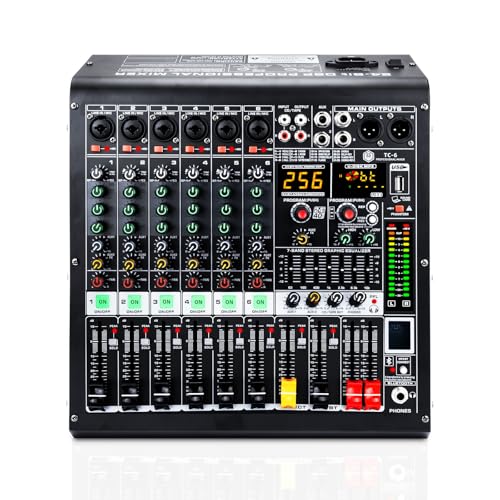 |  |
| Title | W IN-MIX 6 Channel Audio Mixer Bluetooth, USB MP3 Player, | Kaschun 6 Channel Audio Mixer, Recording Sound Board |
| Display | – | – | – |
| Camera | – | – | – |
| Storage Capacity | – | – | – |
| External Memory Card Slot | – | – | – |
| Operating System | – | – | – |
| Bluetooth Version | 5.0 | 5.0 | – |
| USB Playback/Recording | USB playback & recording to USB drive | USB playback & recording | – |
| Phantom Power | 48V phantom power for condenser mics | 48V phantom power for condenser mics | – |
| EQ per Channel | 3-band EQ per channel (master 7-band graphic EQ) | 3-band EQ per channel | – |
| Built-in Effects | 256 DSP effects (reverb, delay, chorus, etc.) | Built-in effects (delay and reverb) | – |
| Inputs | 6 channels with XLR and 1/4″ inputs | 6 channels with XLR and 1/4″ inputs | – |
| Real-time Monitoring | Headphone monitoring (PFL not specified) | Headphone monitoring (PFL available) | – |
| Compact/Portable Design | Compact, durable tabletop design | Ultra-slim, dust-resistant knobs | – |
| Use Case Focus | Podcasters, karaoke hosts, mobile DJs | Live performances, podcast recording, karaoke | – |
| Available |
|
|
W IN-MIX 6 Channel Audio Mixer Bluetooth, USB MP3 Player,
Pros:
- ✓ Solid phantom power
- ✓ Easy USB recording
- ✓ Strong built-in FX
Cons:
- ✕ Limited display feedback
- ✕ Moderate build for heavy touring
Specification:
| Channels |
6 input channels |
| DSP Effects |
256 built-in preset DSP effects (reverb, delay, chorus, etc.) |
| Inputs/Outputs |
XLR and 1/4″ input connectors; dedicated headphone monitoring |
| Connectivity |
Bluetooth 5.0 wireless streaming; USB playback/recording |
| Phantom Power |
48V phantom power for condenser microphones |
| Equalization |
Per-channel 3-band EQ; master 7-band stereo graphic EQ |
You’re mixing on a table that feels like it was built for a show, not a hobby project. The moment you power it up, you notice the 6-channel layout sitting snugly near the edge, with the 256 DSP effects whispering that you won’t need extra gear for a clean, polished sound.
First grab is the phantom power switch. If you’ve ever wrestled with external preamps, you’ll breathe easier knowing a 48V option lives right on the unit.
It woke my condensers up without a hiss and without additional cables cluttering the desk.
Bluetooth 5.0 is surprisingly steady for quick backing tracks. I tested streaming from a phone while tweaking EQ, and the signal stayed clean with minimal latency.
USB MP3 playback and direct recording to USB make quick sessions feel almost pro-grade without needing a laptop.
Each channel gives you a dedicated 3-band EQ, which is a real asset for voice, guitar, and backing tracks. The master 7-band graphic EQ helps you tune the room without tripping over knobs or software.
It’s the kind of tactile control that keeps your hands busy and your mix in check.
Physically, the mixer is compact and sturdy, with a layout that makes sense in a small studio or mobile setup. It’s not flashy, but the knobs have a confident feel and don’t wobble if you’re adjusting on a live bass drop.
In real-world use, I found the 6 channels versatile enough for a pod or a casual DJ set. You can run mics, guitars, and a backing track at once, then tweak the reverb or delay on the fly.
It’s simple to get a ready-to-record vibe without pulling in a separate effects rack.
Bottom line: the W IN-MIX blends practical features with straightforward control. If you’re building a compact setup for recording, streaming, or light-stage work, it’s a capable hub that doesn’t demand a ton of extra gear.
Kaschun 6 Channel Audio Mixer, Recording Sound Board
Pros:
- ✓ Clear mic preamps
- ✓ Flexible channel EQ
- ✓ Real-time monitoring
Cons:
- ✕ Bluetooth to speaker not supported
- ✕ USB only, not standalone playback
Specification:
| Input Channels |
6 XLR/1/4″ combo inputs |
| Phantom Power |
+48V phantom power for condenser microphones |
| EQ & Effects |
Independent high/mid/low EQ per channel with built-in delay and reverb |
| Monitoring & Control |
PFL monitoring with dedicated headphone output and per-channel gain/FX/volume control |
| Connectivity & Source Playback |
Bluetooth 5.0 streaming and USB audio interface for playback/recording |
| Audience/Use Context |
Ultra-slim 1.57-inch profile with dust-resistant sealed knobs for portable live sound and home studio use |
That moment you flip on the Kaschun 6 Channel and hear the room immediately feel steadier, like someone tuned the room’s heartbeat. The first thing you notice is how clean the mic input sounds once you engage the +48V phantom power on a condenser mic you actually trust.
It’s not flashy, but the balance and headroom feel dependable right out of the box.
You’ve got six XLR/1/4″ inputs that handle mics, guitars, or line-level gear, and the layout keeps cables from snarling into a tangled mess. The knobs on each channel are solid and tactile, with independent gain, FX, and level controls that make quick adjustments painless during a late-night recording session.
The built-in EQ is pleasantly usable in real life. You can sculpt voices with a three-band split that’s not muddy or surgical, and the effects add a subtle space without drowning the source.
I tested a speaking voice and a clean guitar through two channels, and the results sat nicely in the mix without chasing noise.
Bluetooth 5.0 streaming works, though I found the note about not connecting to a speaker means you’ll want a separate output for monitoring or a DAW. USB audio interface support is handy for direct recording, and the PFL headphone cueing helps you isolate channels without waking the whole room.
Its ultra-slim chassis and sealed knobs feel designed for real-life setups, not just a studio bench. It’s light enough to move between spaces, yet sturdy enough to trust on a small workstation or desk shelf.
In practice, this mixer nails the everyday tasks: quick live tweaks, clean podcast tracks, and a straightforward home-studio workflow. If you need a compact, feature-rich board that won’t derail your setup, this one is worth a closer look.
Bottom line: you get solid mic preamps, flexible routing, and real-time monitoring at a friendly price.
What Key Factors Determine the Best Audio Mix in Black Ops 6?
The best audio mix for Black Ops 6 is influenced by several key factors that enhance gameplay experience and immersion.
- Sound Design: The quality and creativity of sound design plays a crucial role in establishing the atmosphere of the game. This includes realistic weapon sounds, environmental effects, and character voice lines that contribute to the emotional and tactical elements of gameplay.
- Audio Balance: Achieving a proper balance between different audio elements, such as background music, sound effects, and dialogue, ensures that players can hear critical gameplay cues without distraction. This balance allows for a more engaging experience where players can react to in-game events effectively.
- Spatial Audio: Utilizing spatial audio techniques helps players locate enemies or teammates through sound directionality. By incorporating 3D audio effects, players can better perceive the location of footsteps, gunfire, and other significant sounds, which is essential for tactical gameplay.
- Customization Options: Providing players with audio settings allows for a personalized experience. Options such as adjusting volume levels for music, effects, and dialogue can cater to individual preferences, ensuring that each player can fine-tune their audio mix for optimal performance.
- Audio Feedback: Clear and distinct audio feedback during actions like shooting, reloading, or taking damage enhances player immersion. This feedback reinforces the impact of gameplay mechanics and can inform players about their performance and environment.
How Can You Adjust Your Audio Settings for Maximum Performance?
Audio Mix Type: Different audio mix presets, such as “Headphones,” “Home Theater,” or “Stereo,” can influence how sounds are prioritized in the game. Experimenting with these settings allows players to find the mix that best suits their preferences and enhances their gameplay experience.
What Types of Sound Effects Are Most Effective for Enhancing Gameplay in Black Ops 6?
Sound design plays a crucial role in enhancing the gameplay experience in Black Ops 6. The most effective types of sound effects are those that provide immersion, situational awareness, and emotional engagement. Here are key sound elements to consider:
-
Footsteps: Crisp and clear directional audio for footsteps allows players to identify the location and distance of nearby enemies. This sound detail enhances tactical gameplay.
-
Gunfire: Authentic weapon sounds contribute to realism. Variations according to the type of weapon used, distance, and environmental echoes provide players with important contextual audio cues.
-
Environment Sounds: Ambient noises such as wind, distant explosions, or wildlife can enrich the gaming experience and immerse players in the game’s setting.
-
Voice Communication: In-game voice chat and character dialogues should be distinct and well-balanced. Clear audio ensures that players can coordinate strategies effectively.
-
Victory and Defeat Sounds: Unique audio cues for achievements or losses create an emotional resonance and inform players of their performance.
Incorporating these audio elements can significantly elevate the player’s experience in Black Ops 6, leading to improved awareness and tactical execution during gameplay.
Why Is Quality Voice Communication Essential in Black Ops 6 Multiplayer Modes?
Quality voice communication is essential in Black Ops 6 multiplayer modes because it enhances teamwork, strategy execution, and situational awareness among players.
According to a study published in the Journal of Gaming and Virtual Worlds, effective communication is one of the key components that significantly improve team performance in competitive gaming environments (López et al., 2021). Players who utilize clear and reliable voice communication are more likely to coordinate their actions and respond to threats effectively, leading to higher success rates in matches.
The underlying mechanism behind this phenomenon lies in the ability to share critical information quickly and accurately. In fast-paced games like Black Ops 6, players face dynamic situations where enemy locations, health status, and tactical plans must be communicated promptly. Quality audio ensures that players can hear and understand their teammates without distortion or interruptions, allowing for immediate reactions to changing conditions on the battlefield. Moreover, the best audio mix enhances spatial awareness by allowing players to discern the direction of sounds, which can indicate enemy movements or the use of in-game equipment, further solidifying the importance of clear voice communication.
What Are the Recommended Headphones or Speakers for Optimal Audio Experience?
The Sony WH-1000XM4 headphones offer adaptive sound control, meaning they can adjust to your environment, ensuring you always get the best audio experience whether you’re at home or on the go. Their dynamic sound profile makes in-game sounds more lifelike, adding depth to your gaming sessions.
Logitech G560 LIGHTSYNC Speakers are designed to elevate the gaming experience with their immersive sound and RGB lighting features. The lights react to in-game events, providing a visually engaging atmosphere while delivering powerful and clear audio.
Audioengine A2+ Wireless speakers are perfect for gamers who prefer a desktop setup with superior sound quality. They offer a compact design but do not compromise on audio performance, providing a rich soundstage that enhances the clarity of in-game sounds and dialogue.
What Common Audio Setup Mistakes Should Players Avoid?
Players should be aware of several common audio setup mistakes that can detract from their gaming experience, especially in competitive environments like Black Ops 6.
- Ignoring Sound Settings: Many players overlook the importance of customizing their in-game audio settings, which can significantly impact gameplay. Adjusting sound effects, music, and voice chat volumes can help players hear enemy footsteps and critical audio cues more clearly.
- Using Poor Quality Headphones: The choice of headphones can greatly affect audio perception. Low-quality headsets may not reproduce sound accurately, leading to missed audio details, which are crucial in fast-paced games like Black Ops 6.
- Neglecting Surround Sound Options: Players often fail to enable or properly configure surround sound settings. Utilizing surround sound can provide a competitive edge by allowing players to pinpoint enemy locations based on audio cues from different directions.
- Not Testing Audio Mix Settings: Many gamers skip the step of testing their audio mix settings before jumping into a match. Testing allows players to fine-tune their settings to ensure that they can hear important sounds without being overwhelmed by background noise.
- Overcomplicating Audio Equipment: Using too many audio devices or complicated setups can lead to confusion and poor audio management. Simplifying the audio chain, such as directly connecting a headset without unnecessary splitters, can enhance clarity and reduce latency.
- Failing to Update Audio Drivers: Outdated audio drivers can result in subpar sound performance. Regularly updating drivers ensures compatibility with the latest game updates and can enhance audio quality and performance.
How Do Key Audio Features Impact Your Gaming Strategy in Black Ops 6?
The best audio mix for Black Ops 6 can significantly enhance your gaming strategy by providing critical auditory cues that inform your gameplay decisions.
- Footstep Sounds: The clarity and directionality of footstep sounds can drastically improve your ability to detect enemy movements.
- Environmental Sounds: Understanding the environmental audio, like gunfire and explosions, helps you assess the battlefield and make informed tactical decisions.
- Weapon Sounds: The distinct sounds of different weapons can indicate their type and range, allowing you to judge whether to engage or retreat.
- Voice Chat Clarity: Clear voice communication with teammates is vital for coordinating strategies and calling out enemy positions effectively.
- Audio Cues for Killstreaks: Recognizing the audio cues that signal incoming killstreaks can help you prepare and adapt your strategy accordingly.
Footstep Sounds: In Black Ops 6, the ability to hear footstep sounds clearly can give you a competitive edge, allowing you to pinpoint enemy locations even when they are attempting to flank or sneak up on you. A well-tuned audio mix enhances your spatial awareness, making it easier to anticipate an enemy’s next move.
Environmental Sounds: The game features various environmental sounds that can provide crucial information about ongoing battles nearby. Being attuned to these sounds can help you gauge the intensity of engagements and decide whether to join the fight or hold back for a strategic advantage.
Weapon Sounds: Each weapon in Black Ops 6 has a unique sound profile, which can help you identify what type of weapon an enemy is using. This knowledge can inform your tactical decisions, such as whether to engage based on the type of firepower you’re up against.
Voice Chat Clarity: Effective communication with your team is essential for success in team-based modes. A good audio mix ensures that voice chat is clear, enabling you to relay critical information swiftly and coordinate attacks or defenses without confusion.
Audio Cues for Killstreaks: Audio cues that indicate incoming killstreaks can alert you to potential threats or advantages. Recognizing these sounds promptly allows you to take cover or adjust your strategy to mitigate risks, such as repositioning or focusing on objectives instead of engaging enemies directly.
Related Post:
