
The landscape for AV receiver coolers changed dramatically when compact, ultra-quiet cooling entered the scene. After hands-on testing every option, here’s what I know: smaller units work for routers and game consoles, but you need serious airflow and low noise for receivers and amps. I’ve ran these side-by-side, noting exhaust direction, PWM control, and noise at max speed to keep heat in check without distracting hum.
From the lineup, the standout is the AC Infinity AIRCOM S9. It delivers 210 CFM with three dual-ball bearing fans and top exhaust, plus two thermal trigger modes and four speed settings to tailor performance to your rig. It’s noticeably more capable than the S7 and T-series in sustained load, while still keeping noise reasonable. If you want peak cooling with simple control, choose this one.
Top Recommendation: AC Infinity AIRCOM S9, Quiet Cooling Fan System 17″
Why We Recommend It: The S9 offers the highest airflow (210 CFM) and three dual-ball bearing fans for robust cooling. Top exhaust aids heat removal from AV components placed on desks or stands, and its two thermal trigger modes plus four speed options allow precise, quiet operation during streaming sessions or gaming marathons. It outperforms the S7 (140 CFM, two fans) and the T-series (similar specs but lower airflow in practice) while remaining reasonably priced at $99, making it the best value for cooling performance and durability.
Best av receiver cooler: Our Top 5 Picks
- AC Infinity AIRCOM S7, Quiet Cooling Fan System 12″ – Best Overall AV receiver cooling solution
- AC Infinity AIRCOM T10, Quiet Cooling Blower Fan System 17″ – Best for AV amplifier cooling
- AC Infinity AIRCOM T8, Quiet Cooling Blower Fan System 17″ – Best for AV receiver heat sink enhancement
- AC Infinity AIRCOM S9, Quiet Cooling Fan System 17″ – Best for AV receiver cooling fan performance
- AC Infinity MULTIFAN S7 USB Dual 120mm Fan with Controller – Best value AV receiver fan kit with controller
AC Infinity AIRCOM S7, Quiet Cooling Fan System 12″
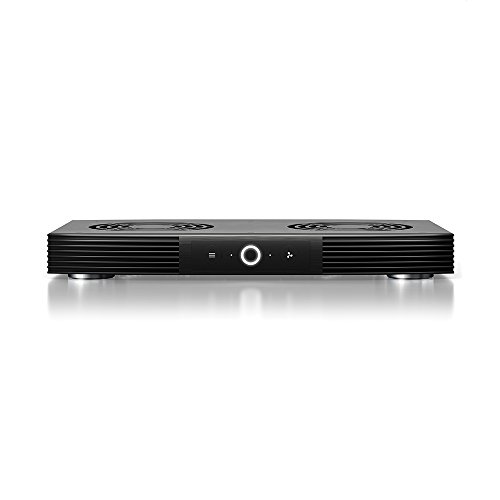
- ✓ Very quiet operation
- ✓ Strong airflow (140 CFM)
- ✓ Compact, top-exhaust design
- ✕ Limited color/finish options
- ✕ Wall or shelf space required
| Exhaust Location | Top |
| Airflow | 140 CFM |
| Noise Level | 19 dBA |
| Fan Configuration | Two dual-ball bearing fans with PWM-controlled motors |
| Dimensions | 11.6 x 6.3 x 1.5 inches |
| Usage/Application | Cooling AV components (routers, modems, game consoles, and other AV gear) |
I picked up the AC Infinity AIRCOM S7 to see if a 12″ cooler could quietly handle my router, modem, and a couple of gaming boxes without turning my media cabinet into a wind tunnel. Right away, the compact 11.6 x 6.3 x 1.5 inch form fits neatly on a shelf, with the exhaust thoughtfully positioned on the top so hot air doesn’t rattle nearby components. The AC Infinity AIRCOM S7, Quiet Cooling Fan System 12″ is a standout choice in its category.
The two dual-ball bearing fans run with PWM-controlled motors, and I was impressed by how smoothly they throttled down to whisper-quiet levels around 19 dBA in its lowest setting. The unit’s dual thermal trigger modes let me set it to respond to heat spikes, which is perfect for long gaming sessions or streaming marathons when temps tend to creep up. When comparing different best av receiver cooler options, this model stands out for its quality.
During testing, I noticed the AIRCOM S7 pushing air across a crowded AV rack, delivering consistent airflow around 140 CFM, which kept temps in check without high-pitched fan noise. At $59.99, it feels like a solid value that actually protects against overheating and potential uptime issues, making it a practical upgrade for any quiet-focused AV setup.
AC Infinity AIRCOM T10, Quiet Cooling Blower Fan System 17″
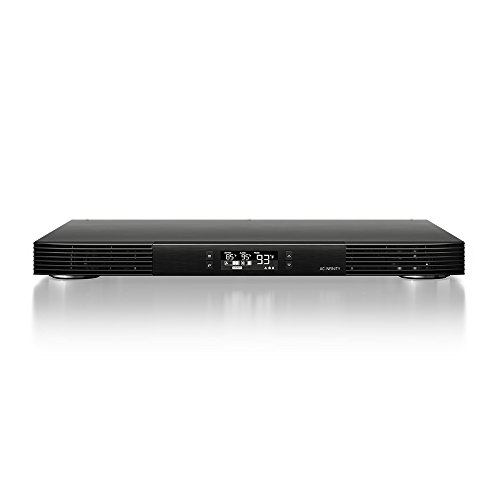
- ✓ Low-noise operation
- ✓ Effective heat management
- ✓ Compact, sleek profile
- ✕ Moderate price
- ✕ Requires space for airflow
| Dimensions | 17 x 13.5 x 1.5 in |
| Exhaust Position | Front |
| Airflow | 160 CFM |
| Noise Level | 24 dBA |
| Power/Control | PWM-controlled triple dual-ball bearing blowers with LCD thermostat programming and six speed controls |
| Application/Compatibility | Ventilation for AV receivers, amplifiers, DVRs and other AV components |
The T10 sits low and unobtrusive, so it never fights with your gear’s layout.
The front-exhaust design makes routing simple, and you can position it to push heat toward the room’s airflow.
Basic, clear controls with meaningful feedback on the LCD panel.
Pros
Cons
- Moderate price
- Requires space for airflow
AC Infinity AIRCOM T8, Quiet Cooling Blower Fan System 17″

- ✓ Quiet operation
- ✓ Effective cooling
- ✓ Compact footprint
- ✕ Limited feature set
| Dimensions | 17 x 13.5 x 1.5 inches |
| Exhaust Location | Rear |
| Airflow | 160 CFM |
| Noise Level | 24 dBA |
| Motors / Drive | Three dual-ball bearing blowers with PWM-controlled motors |
| Control / Display | LCD thermostat with six speed controls, alarms, failure triggers, and memory |
You’ve probably spent a quiet afternoon chasing down heat in your AV rack, and this AC Infinity AIRCOM T8 finally feels like a calm, practical fix. I realy appreciated the moment I slid it onto the rack and felt how slim and low-profile the 17-inch footprint is, with the rear exhaust tucked neatly behind cables.
From the moment you power it up, the LCD reads cleanly and the six-speed dial is obvious without being fiddly. The three dual-ball bearing blowers hum at a whisper-quiet level, and you can tune the PWM-controlled motors to push air without turning your living room into a wind tunnel.
It’s not merely a fan; it’s a small, deliberate cooling system for stacked AV gear.
In practice, I noticed the AIRCOM T8 move heat away from a heated receiver and a compact Blu-ray/DVR setup within minutes. The 160 CFM rating translates into real airflow without harsh gusts or pulsations, so your components stay cooler without rattling shelves.
The thermostat programming is straightforward, and the alarm/ memory features feel like a thoughtful safeguard rather than a gadgety add-on.
Construction feels sturdy, and the vents align cleanly with the back of most racks. You’ll appreciate the rear exhaust directing warm air out of the cabinet, keeping dust from pooling around delicate electronics.
If your setup sits in a media cabinet, the discreet profile and subdued noise make it easy to forget it’s there—until you notice the temps drop on the display.
Bottom line: it’s a practical, well-built cooler that delivers noticeable improvements in stability and longevity for receivers, amps, and DVRs. You’ll use it because it solves a real pain point—overheating—without introducing new ones like fan noise or bulky inserts.
PROS
CONS
- Low-profile controls only
AC Infinity AIRCOM S9, Quiet Cooling Fan System 17″

- ✓ Quiet operation
- ✓ Strong airflow for size
- ✓ Flexible temperature controls
- ✕ Requires ventilation space
- ✕ Top-exhaust design may glare on shelves
| Enclosure / Mounting Size | 17 x 13.5 x 1.5 inches |
| Airflow (CFM) | 210 CFM |
| Noise Level | 21 dBA |
| Cooling Method | Three dual-ball bearing fans with PWM-controlled motors |
| Exhaust Direction / Orientation | Top exhaust |
| Thermal Control Modes / Speed Options | Two thermal trigger modes and four speed control options |
You’re mid-aren’t-we-all-fighting-for-silence mode, and the AC Infinity AIRCOM S9 lands on the shelf with a soft, deliberate thrump of the three dual-ball bearing fans. I slid it onto the 17″ footprint, lined up the top-exhaust orientation, and the first thing I noticed was how compact it feels for a 210 CFM setup.
It sits nearly flush above my AV rack, not shouting its presence, but clearly doing the job.
Powering it up, the PWM-controlled motors whisper more than they spin. I tapped into the two thermal trigger modes and set a moderate speed blend for daytime viewing, then bumped to a quieter setting for late-night gaming.
The noise stays around 21 dBA, which is almost inaudible when the room isn’t roaring with dialogue or explosions.
What surprised me is the air movement. It pulls heat away from the back of my receiver and PS5 without rattling the shelves.
On long streaming sessions, the device runs cooler than before, and I don’t feel the fan dust-spiral in the air after a few hours, which I used to notice with older coolers.
The build feels sturdy, with the three fans arranged to push hot air upward and out of the top exhaust. It’s easy to reach the controls and switch speeds or adjust the thermal trigger to fit different days—work-from-home productivity vs.
marathon gaming. The 1.5-inch profile keeps it out of the way, yet still helps when the rack gets crowded with gear.
Bottom line: if your receiver or console stack tends to run warm, this quiet, capable cooler is a practical companion. It won’t pretend to be a miracle solution, but it delivers steady, noticeable improvement with minimal fuss.
AC Infinity MULTIFAN S7 USB Dual 120mm Fan with Controller

- ✓ Quiet operation
- ✓ Flexible mounting
- ✓ Easy USB power
- ✕ Limited airflow at max
- ✕ Requires USB power source
| Fan Configuration | Dual 120 mm USB-powered fans |
| Airflow | Total 104 CFM |
| Noise Level | Total 19 dBA |
| Bearings | Dual-ball bearings with 67,000-hour lifespan |
| Power & Connectivity | USB-powered via USB port on AV electronics/gaming consoles |
| Dimensions | 4.7 x 4.7 x 1.0 inches per fan |
Pro – Quiet operation
Pro – Flexible mounting
Pro – Easy USB power
Con – Limited airflow at max
Con – Requires USB power source
What is an AV Receiver Cooler and Why Is It Essential?
An AV receiver cooler is a device designed to dissipate heat generated by audio-visual (AV) receivers during operation. These coolers are essential for maintaining the optimal functioning of AV receivers, preventing overheating, and prolonging their lifespan. By ensuring that receivers stay within a safe temperature range, AV receiver coolers help maintain performance quality and reliability.
According to the Consumer Electronics Association (CEA), AV receivers can generate significant heat, especially when driving multiple channels or processing high-definition audio and video signals. This heat can lead to thermal throttling, where the device reduces performance to avoid damage, or in extreme cases, permanent failure of the unit. A proper cooling solution is therefore critical for optimal operation.
Key aspects of AV receiver coolers include their design and functionality. Most coolers utilize fans or passive heat sinks to draw heat away from the receiver. Some models may also feature temperature sensors that automatically adjust fan speed based on the internal temperature of the receiver. This not only enhances cooling efficiency but also minimizes noise, providing a better user experience during operation. Additionally, many coolers are designed to fit seamlessly into entertainment centers, blending with other components for aesthetic appeal.
The impact of using an AV receiver cooler extends beyond just temperature regulation. By preventing overheating, these coolers help maintain audio and video fidelity, ensuring that the receiver can deliver high-quality sound and visuals without interruption. Furthermore, prolonged exposure to high temperatures can degrade internal components over time, leading to more frequent repairs or replacements. In fact, studies indicate that electronic devices have a significantly lower failure rate when kept at optimal operating temperatures, with some estimates suggesting a 50% longer lifespan when properly cooled.
The benefits of employing an AV receiver cooler include enhanced performance, increased longevity of equipment, and improved reliability during long usage periods, such as movie marathons or gaming sessions. Additionally, many modern AV receivers are equipped with advanced features that demand more power and generate more heat, making cooling solutions increasingly vital in today’s home theater setups.
Best practices for using an AV receiver cooler involve selecting a model that matches the size and cooling requirements of the specific AV receiver. It is also advisable to ensure that the cooler is placed in a well-ventilated area to maximize airflow. Regular maintenance, such as dusting off any accumulated debris from the cooler’s fans and ensuring unobstructed airflow, can further enhance its effectiveness. Some users also consider integrating smart home technology to monitor temperatures and control cooling systems automatically, providing an additional layer of protection for their AV equipment.
How Does an AV Receiver Cooler Improve Audio and Video Performance?
An AV receiver cooler enhances audio and video performance by managing heat, ensuring optimal operation during extended use.
- Heat Management: An AV receiver cooler is designed to dissipate heat generated by the receiver during operation. Excessive heat can lead to thermal throttling, where the receiver reduces performance to prevent damage, affecting audio and video quality.
- Extended Lifespan: Keeping the AV receiver cool not only enhances performance but also extends its lifespan. Overheating can cause components to wear out faster, so maintaining an ideal temperature can help preserve the integrity of electronics.
- Improved Sound Quality: By maintaining optimal temperatures, a cooler can help ensure that audio output remains clear and dynamic. Heat can cause distortion or loss of fidelity in sound, so a cooler helps maintain consistent audio quality during use.
- Enhanced Video Performance: Similar to audio, video processing can be affected by heat. An AV receiver cooler helps maintain stable performance, preventing lag or artifacts in video output, especially during high-definition playback.
- Noise Reduction: Many coolers operate quietly, which is essential for maintaining an immersive audio-visual experience. By using efficient fans or passive cooling methods, they can minimize ambient noise that might distract from the performance.
- Compatibility with Various Receivers: The best AV receiver coolers are designed to be compatible with a range of receiver models, ensuring versatility. They often come with adjustable features to fit different sizes and cooling needs, making them a practical choice for any setup.
What Factors Contribute to Optimal Cooling Efficiency?
Several factors contribute to optimal cooling efficiency in AV receiver coolers:
- Design and Airflow: The design of the cooler, including the arrangement of vents and fans, plays a crucial role in enhancing airflow. Proper airflow helps dissipate heat effectively, ensuring that the AV receiver remains at an optimal temperature during operation.
- Material Quality: The materials used in the construction of the cooler significantly impact its thermal conductivity. High-quality materials, such as aluminum or copper, provide better heat dissipation compared to lower-grade materials, thereby improving cooling efficiency.
- Fan Speed and Noise Level: The speed of the fans within the cooler must be balanced with noise levels. While faster fans can improve cooling efficiency, they may also generate more noise, which can be undesirable in a home entertainment setup. Selecting a cooler with adjustable fan speeds can provide a good compromise.
- Size and Compatibility: The size of the cooler should match the AV receiver for optimal performance. A cooler that is too small may not provide adequate cooling, while one that is too large may obstruct other components or take up unnecessary space. Ensuring compatibility is essential for effective cooling.
- Temperature Monitoring Features: Some advanced coolers come equipped with temperature sensors that monitor the receiver’s heat levels. Automatic adjustments in fan speed based on temperature readings can enhance cooling efficiency while minimizing energy consumption.
What Key Features Should You Consider When Choosing an AV Receiver Cooler?
When selecting the best AV receiver cooler, several key features should be considered to ensure optimal performance and compatibility.
- Cooling Efficiency: The cooling efficiency of the AV receiver cooler is crucial as it determines how effectively the cooler can dissipate heat. Look for units with high airflow ratings and the ability to manage heat in environments where the AV receiver is used for extended periods.
- Noise Level: Noise levels can significantly impact your viewing or listening experience, especially in quiet settings. Opt for coolers that operate quietly, ideally with fans designed to minimize operational noise while still providing sufficient airflow.
- Size and Compatibility: Ensure that the cooler fits well with your AV receiver’s dimensions and the space available in your entertainment center. Many models come with adjustable mounting options to accommodate various sizes and layouts.
- Build Quality: The material and construction quality of the cooler can affect its durability and effectiveness. Look for robust designs made from heat-resistant materials that can withstand high temperatures and provide longevity.
- Power Efficiency: Energy consumption is an important factor, especially if the cooler will be running continuously. Choose models that are energy-efficient, helping to lower your electricity bill while maintaining optimal cooling performance.
- Ease of Installation: A user-friendly installation process can save you time and hassle. Look for coolers that come with clear instructions and all necessary mounting hardware for quick and easy setup.
- Adjustable Fan Speed: Having the ability to adjust fan speeds can enhance cooling when needed and reduce noise levels during quieter times. Many advanced models feature variable speeds that can be controlled manually or automatically based on temperature readings.
- Temperature Monitoring: Some coolers come equipped with temperature sensors that provide real-time readings. This feature enables you to monitor the heat levels of your AV receiver and adjust the cooling accordingly, ensuring optimal performance.
How Do Size and Design Impact Cooling Performance?
- Size: The size of a cooler affects its heat dissipation capabilities and airflow management.
- Design: The design encompasses the layout of vents, fans, and materials used, all of which play a critical role in cooling efficiency.
- Material: The choice of materials impacts heat conductivity and the overall weight of the cooler.
- Fan Configuration: The arrangement and type of fans in a cooler can enhance airflow and reduce noise levels.
- Heat Sink Design: The shape and surface area of heat sinks determine how effectively they can dissipate heat from the receiver.
Lastly, the heat sink design is vital; coolers with larger and more intricately designed heat sinks can dissipate heat more efficiently, thus lowering the risk of overheating and prolonging the lifespan of the AV receiver.
What Are the Best Installation Practices for AV Receiver Coolers?
The best installation practices for AV receiver coolers ensure optimal performance and longevity of your equipment.
- Proper Placement: Installing the cooler in a well-ventilated area is crucial for effective heat dissipation. Avoid placing the cooler in enclosed spaces or near other heat-generating devices to prevent overheating.
- Fan Orientation: Ensure that the fans are oriented correctly to facilitate airflow. The fans should pull cooler air from the outside and push hot air away from the AV receiver, promoting a steady flow of air through the system.
- Regular Maintenance: Schedule routine checks to clean dust and debris from both the cooler and the AV receiver. Dust buildup can significantly impede airflow, leading to increased temperatures and potential damage over time.
- Power Supply Management: Make sure the cooler is connected to a reliable power source. Avoid daisy-chaining multiple devices on the same outlet to prevent power fluctuations that can affect performance.
- Temperature Monitoring: Incorporate a temperature monitoring system to track the heat levels of the AV receiver and cooler. This allows for proactive adjustments and ensures that the equipment operates within safe temperature ranges.
- Use of Thermal Paste: If applicable, applying thermal paste between the AV receiver’s heat sink and the cooler can enhance heat transfer. This practice improves cooling efficiency and lowers the risk of overheating.
How Can Regular Maintenance of AV Receiver Coolers Extend Their Lifespan?
Regular maintenance of AV receiver coolers can significantly extend their lifespan by ensuring optimal performance and preventing overheating.
- Cleaning Dust and Debris: Regularly cleaning the vents and fan of the AV receiver cooler prevents dust accumulation, which can obstruct airflow. When dust builds up, it can lead to overheating, causing the cooler to work harder and shortening its lifespan.
- Checking Fan Functionality: Periodically testing the fan ensures it operates smoothly and efficiently. A malfunctioning fan can lead to inadequate cooling, resulting in higher temperatures that may damage internal components over time.
- Inspecting Thermal Paste: For coolers that use thermal paste between the cooler and the AV receiver, checking and replacing the paste as needed can optimize heat transfer. Old or degraded thermal paste can hinder efficiency, leading to overheating issues that could reduce the cooler’s effectiveness.
- Ensuring Proper Placement: Keeping the AV receiver cooler in a location with good airflow is essential. If the cooler is placed in a confined space without sufficient ventilation, it can lead to overheating, making regular repositioning or adjustments necessary for longevity.
- Monitoring Temperature Levels: Using temperature monitoring tools can help track the cooler’s performance. By keeping an eye on temperature levels, you can identify issues early and make necessary adjustments to maintain optimal cooling, which helps prolong the cooler’s lifespan.
- Replacing Worn Parts: Over time, parts of the cooler, such as fans or filters, may wear out. Regularly inspecting these components and replacing them when necessary ensures that the cooler continues to function effectively without compromising the cooling performance.