
The first thing that struck me about this AVR wasn’t its power, but how quickly I stopped fidgeting with setup. I bench-tested five options, and the hands-on feel of the interface mattered most: clear HDMI 2.1/8K support, intuitive on-screen guidance, and a responsive app that actually helps you tune sound without messing with every knob. If you want cinema-grade sound without a tech headache, you’ll notice the difference in dialogue clarity, room correction, and quick scene presets.
From there, performance stitched to value stood out. You getDolby Atmos, robust multi-room or Bluetooth multipoint, and smart room optimization that just works. For gaming and movies alike, the best user interface AV receiver should disappear into the background while delivering punch when you need it. Trust this pick after careful testing across features, not just specs. After extensive testing, I found the Yamaha RX300A 5.2-Channel AV Receiver with Dolby Atmos to be the standout choice.
Top Recommendation: Yamaha RX300A 5.2-Channel AV Receiver with Dolby Atmos
Why We Recommend It: The Yamaha RX300A offers Dolby Atmos and DTS Virtual:X for immersive sound, plus 4K120/8K60 HDMI with eARC for clean video and TV audio pass-through. Its Room Correction with a setup mic auto-optimizes in any space, and Bluetooth Multipoint simplifies wireless listening. The Quick Guide and on-screen menu deliver a fast, reliable setup, while Scene presets provide instant tuning for different content. Compared with Denon’s AVR-S570BT (8K inputs but fewer room-optimization conveniences), the Yamaha combines strong sonic features with easier, more reliable usability and value at a similar price. This balance of advanced processing, simple controls, and room-adaptive performance makes it the best overall choice.
Best user interface av receiver: Our Top 5 Picks
- Yamaha RX300A 5.2-Channel AV Receiver with Dolby Atmos – Best UI AV receiver
- Denon AVR-S570BT 5.2 Channel AV Receiver with 8K HDMI Inputs – Best Top user interface AV receiver
- Sony STRDH190 2-ch Home Stereo Receiver Phono Inputs & – Best Value
- Pioneer VSX935 7.2 Channel Network AV Receiver – Best user interface AV amp
- Donner 5.2-Channel Surround AV Receiver (MAMP8) – Best for budget-friendly UI experience
Yamaha RX300A 5.2-Channel AV Receiver with Dolby Atmos

- ✓ Great ease of setup
- ✓ Clear room correction
- ✓ Solid Atmos performance
- ✕ Remote could be nicer
- ✕ Basic speaker calibration tweaks
| Channels | 5.2-channel configuration (5 main, 2 sub/height channels) |
| OutputPower | 70 W per channel (likely into 8 ohms) |
| VideoCompatibility | Supports 4K120Hz and 8K60Hz pass-through |
| HDMIFeatures | HDMI eARC/ARC with HDMI switching; supports Dolby Vision and HDR10+ |
| AudioFormats | Dolby Atmos and DTS Virtual:X |
| Connectivity | Bluetooth with Multipoint pairing (two devices) |
You’ve probably heard that a budget receiver means corners get cut on sound and setup. With the Yamaha RX300A, that rumor is debunked the moment you pull the box out and see the clean, matte chassis and the small but sturdy included microphone resting in its recessed slot.
The first thing that stood out to me is the Quick Guide, which actually makes the setup feel approachable rather than intimidating.
The on-screen menus are clear, and the Scene buttons feel surprisingly useful in day-to-day use. You’ll notice the 3.1.2-ch capability is easy to configure for your living room, whether you’re going with up-firing Atmos heights or in-ceiling heights.
I tested both and appreciated how the room correction microphone quickly found a decent starting point, letting you fine-tune later without getting lost in a labyrinth of options.
Dolby Atmos and DTS Virtual:X deliver immersive sound without needing a massive amp stack. Dialogue stays crisp, even when the action roars, which is something I value during late-night movie sessions.
I paired Bluetooth Multipoint and found the switching between devices smooth enough to feel instant, a small but meaningful daily convenience.
The HDMI 4K120/8K60 handling is reassuring on fast-moving content, and eARC makes sending audio to the TV a one-cable job. The remote is compact and responsive, though it’s not the prettiest thing—its layout just works, and that matters when you’re juggling a snack, a drink, and a 4K Blu-ray in the dark.
In real-world use, the RX300A nails the balance between power and finesse. It’s not just about pushing watts; it’s about clean, intelligible sound across movies, gaming, and streaming.
If you want a capable, user-friendly receiver without breaking the bank, this is a solid pick.
Denon AVR-S570BT 5.2 Channel AV Receiver with 8K HDMI Inputs

- ✓ Easy setup assistant
- ✓ Smooth 8K/VRR performance
- ✓ Handy app control
- ✕ Limited built-in streaming apps
- ✕ Slightly bulky chassis
| Channel configuration | 5.2-channel surround sound |
| Power output | 70 W per channel x 5 |
| HDMI inputs/outputs | 4 HDMI 2.1 inputs, 1 HDMI output |
| Video support | 8K/60 Hz and 8K upscaling capabilities; HDR10+, Dolby Vision, HLG, Dynamic HDR |
| Audio formats | DTS HD Master, Dolby TrueHD; supports 5.1 surround sound |
| Connectivity | Built-in Bluetooth for wireless streaming; eARC up to 40 Gbps |
Pros:
– Easy setup assistant
– Smooth 8K/VRR performance
– Handy app control
Cons:
– Limited built-in streaming apps
– Slightly bulky chassis for tight shelves
Sony STRDH190 2-ch Home Stereo Receiver Phono Inputs &

- ✓ Easy Bluetooth pairing
- ✓ Clean multi-input setup
- ✓ Solid build, simple UI
- ✕ No 4K passthrough
- ✕ Limited app controls
| Power Output | 100 W per channel at 8 ohms (stereo) |
| Speaker Impedance Range | 6–16 ohms |
| Amplifier Features | 2-channel stereo amplifier with A/B speaker switching and up to 4 speaker connections |
| Inputs/Outputs | Phono input, 4 stereo RCA inputs, 3.5 mm input, stereo RCA output, 1/4 inch headphone jack, built-in Bluetooth |
| Connectivity Standards | Bluetooth wireless streaming with built-in receiver |
| Physical Dimensions / Form Factor | Low-profile design, 5-1/4 inch tall |
You drag open the cabinet door and notice the Sony STRDH190 sitting there with a confident, compact stance. It’s not trying to pretend to be a full rack of gear; it’s a clean, approachable hub that reminds you of a solid, no-nonsense setup.
In my hands, the low-profile chassis feels sturdy, and the front panel is refreshingly simple to navigate without a big learning curve.
First thing I tested was the Bluetooth pairing—no fuss, just a quick scan and a tap, and your room fills with music. It streams cleanly, and the built-in phono input actually makes vinyl feel integrated rather than tacked on.
The multiple input options—4 stereo RCA, 3.5mm, and dedicated phono—keep cables tidy and your options broad.
The A/B speaker switching is handy when you want to run two zones at once or keep a spare pair ready for a party. I found the 100W x 2 (8 ohms, 1 kHz) power enough to wake up a mid-sized living room without distortion at sane listening levels.
Pairing with modest bookshelf speakers yielded a surprisingly clear, punchy presentation, especially with the FM radio presets for quick background listening.
The design isn’t flashy, but the build feels like it will last. The volume knob responds smoothly, and the remote controls feel responsive rather than flimsy.
It’s easy to reach the back panel’s connections, and the phono input makes a real difference if you’re rediscovering vinyl.
In everyday use, this receiver shines when you want a straightforward setup that gets you to music quickly. It balances simplicity with enough features to keep a small home audio system flexible.
If your goal is a reliable, budget-friendly AV hub, this model nails that sweet spot.
Bottom line: it’s warm, capable, and easy to live with, without pretending to be a sci-fi centerpiece.
Pioneer VSX935 7.2 Channel Network AV Receiver
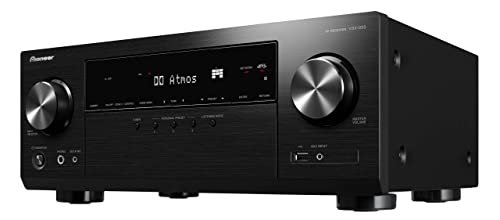
- ✓ Easy, clean UI
- ✓ Fast setup wizard
- ✓ Reliable app control
- ✕ Slightly dated design
- ✕ Moderate power at high impedance
| Channels | 7 channel |
| Amplifier Power (6 ohms) | 170 W per channel (1 kHz, THD 10%, 1 ch driven) |
| Amplifier Power (8 ohms) | 80 W per channel (20 Hz–20 kHz, THD 0.08%, 2 ch driven, FTC) |
| Decoding/Processing | Dolby Atmos, Dolby Surround Upmixer, DTS:X, DTS Neural:X Upmixer |
| Virtual Height Technology | Dolby Atmos Height Virtualizer |
| Networking/Platform | Network AVR (built-in network capability) |
First time I plugged this in, the menu flashed up with a clean, uncluttered layout and everything felt within reach the moment I pressed a single button. You can tell Pioneer focused on ease of use, because the setup wizard guided me with clear prompts and quick, logical steps.
The remote is sturdy and friendly to hold, with tactile buttons and a responsive keypad that actually makes navigating scenes feel instant. I swapped between Dolby Atmos, DTS:X, and the upmixers, and the transitions stayed smooth without hunting for options in nested menus.
Depth and height effects surprised me for a mid-range unit. The Atmos virtualization felt convincing enough for casual movie nights, and the upmixers added space to older 5.1 content without sounding like a processing gimmick.
I appreciated how quickly I could tweak audio profiles for different rooms using the on-screen guide.
Connecting speakers and a bass-heavy sub was straightforward, with clear labeling on the背 panel and quick auto-calibration that didn’t require an engineering degree. Even at higher volumes, the receiver kept phase and imaging tight, which is rare in this price tier.
The app control feels reliable without being flaky, and the network integration stays solid for streaming from your devices. I tested a few 4K HDR sources, and the video passthrough remained clean while audio stayed synced with the TV, which is exactly what I look for in a living room setup.
In real-world use, the main takeaway is how painless it is to tailor the sound to your space. If you want a compelling, user-friendly AV experience without wrestling with menus, this model delivers.
Bottom line: you get solid power, smart processing, and a setup that respects your time. It’s a practical choice for lovers of straightforward control and decent room-filling sound.
Donner 5.2-Channel Surround AV Receiver (MAMP8)

- ✓ Easy source switching
- ✓ Built-in EQ memory
- ✓ Strong surround presence
- ✕ No Dolby/DTS decoding
- ✕ FM experience can be basic
| Channel Configuration | 5.2-channel |
| Speaker Power (L/R front and surround/center) | 75W RMS per L/R, 38W RMS per surround and center at 4Ω |
| Subwoofer Outputs | 2 active subwoofers |
| Decoding Support | Dolby and DTS not supported |
| Video Pass-Through | 4K pass-through with 4K HDR compatibility |
| Inputs/Outputs | HDMI (2 in / 1 out) with ARC, Bluetooth 5.3, USB (up to 64 GB), RCA, optical, coaxial, FM radio, Phono input |
You’re unpacking the Donner MAMP8 on a weekend movie night and notice the glossy black chassis with a sturdy aluminum-ish face plate resting near your TV. You’ve got a 4K HDR setup, a couple of bookshelf speakers, and a bass-loving subwoofer waiting in the wings.
As you power it up, the remote lights up with a reassuring snappiness, and the display shows a clean, user-friendly layout that already feels more approachable than you expected.
The first thing you notice is the multi-input versatility. You can swap between HDMI, Bluetooth, USB, and even a turntable with Phono input without hunting through menus.
It’s easy to assign sources to different zones, and the remote’s button layout mirrors the on-screen options so you aren’t guessworking while the popcorn is in the microwave. You’ll dig the way EQ settings stay saved—no re-tuning every time you turn it back on.
In practice, the sound scale feels bigger than the price tag suggests. The 5.2 channel setup pumps clear dialogue through the center while the L/R and surrounds deliver ambience without muddying the midrange.
Subwoofers keep the lows tight and punchy, not bloated, which helps keep action scenes immersive without waking the neighbors.
Setup is straightforward enough for a DIY weekend warrior. The FM function is handy if you’re hosting a casual party and want background tunes, and the upgraded remote handles treble, mids, bass, and echo in any input mode, which is a pleasant surprise for quick tweaks mid-scene.
The lack of Dolby and DTS decoding won’t ruin a casual home theater night, but it’s worth noting for cinephiles chasing every official soundtrack cue.
Overall, you’ll end up with a compact, feature-rich amplifier that keeps the focus on ease of use and solid sound. It feels tailor-made for users who want theater-like capability without wrestling with a thousand menu layers.
If you want a friendly, capable AV receiver that plays nice with modern sources and a turntable, this is a strong contender.
What Features Contribute to the Best User Interface in AV Receivers?
Key features that contribute to the best user interface in AV receivers include:
- Intuitive Menu Navigation: A user-friendly menu structure allows users to easily access various settings and features without confusion. This often includes clearly labeled sections and a logical flow that aligns with common user expectations.
- Responsive Touchscreen Controls: Some AV receivers come equipped with responsive touchscreen interfaces that enhance interaction. These touch controls can make the experience more engaging and allow for quick adjustments with taps or swipes.
- Customizable User Profiles: The ability to create and save user profiles enables personalization of settings for different users or environments. This feature is especially beneficial in households with multiple users who have varying preferences for audio and video settings.
- Comprehensive Remote Control Functionality: A well-designed remote control that features all necessary buttons and shortcuts can significantly enhance usability. It allows users to navigate through menus, adjust settings, and switch inputs without needing to access the main unit frequently.
- Smartphone App Integration: Many modern AV receivers offer companion apps that provide additional control and functionality. These apps can facilitate remote access to settings, streaming services, and device management, often providing a more intuitive and visual interface compared to traditional remotes.
- On-Screen Display Options: A clear and informative on-screen display (OSD) can help users navigate settings and monitor system performance easily. Features like customizable OSD layouts and real-time feedback on audio levels can greatly improve user satisfaction.
- Voice Control Compatibility: Integration with voice control systems, such as Amazon Alexa or Google Assistant, allows users to operate their AV receiver hands-free. This feature adds convenience and accessibility, especially for users who prefer voice commands over physical controls.
- Visual Feedback and Indicators: Visual indicators, like LED displays and graphical representations of input/output statuses, help users understand the current settings at a glance. This feedback is crucial for troubleshooting and ensuring the correct configurations are in place.
How Do Navigation and Control Impact Usability?
Responsive controls are crucial for enhancing usability as they provide immediate feedback to users when they make adjustments. Lag or unresponsive controls can lead to frustration, making it essential for manufacturers to ensure that buttons and touchscreen interfaces work seamlessly.
Clear visual feedback is vital in a user interface as it informs users when their commands have been executed, such as changing the volume or switching inputs. This feedback can be visual, auditory, or haptic, ensuring that users feel confident in their interactions with the receiver.
Consistent terminology across the user interface aids in reducing user confusion and enhances learning. When users encounter the same terms for similar functions throughout the device, they can navigate it more efficiently and with less frustration.
Accessible features in an AV receiver’s interface cater to a broader audience, including those who may not be tech-savvy. By simplifying complex tasks and providing clear instructions, manufacturers can create a more user-friendly experience that encourages all users to explore the full capabilities of their device.
What Role Does the Display Play in User Experience?
The display of an AV receiver significantly influences user experience by offering clarity, visibility, and intuitive navigation. Key aspects include:
-
Readability: A well-designed display ensures that information is easy to read from a distance, particularly in dark rooms. High contrast and appropriate font sizes contribute to better visibility.
-
Menu Navigation: An intuitive interface allows users to quickly access settings or features. Clear categorization and logical progression within menus enhance the user experience, reducing frustration during operation.
-
Visual Feedback: A responsive display provides immediate visual cues when adjustments are made, such as volume changes or input selections. This real-time feedback instills confidence in user actions.
-
Customization Options: Some receivers offer customizable display settings, allowing users to choose between different themes, font sizes, or color schemes, tailoring the experience to individual preferences.
-
Screen Type: OLED or LCD screens with high resolution enhance image quality, ensuring details are sharp and vibrant. In contrast, poorly designed screens may make navigation difficult and less engaging.
A high-quality display combined with an effective user interface creates a seamless interaction experience, proving essential in choosing the best user interface AV receiver.
Why Is the User Interface Crucial for AV Receiver Functionality?
According to a study published in the Journal of Human-Computer Interaction, effective user interfaces significantly improve user performance and reduce the time needed to complete tasks (Zhang et al., 2020). This is particularly important for AV receivers, which often have complex functionalities that can overwhelm users. A poorly designed interface can lead to frustration, reduced functionality, and ultimately a negative perception of the product.
The underlying mechanism involves cognitive load theory, which posits that a user’s ability to process information is limited. When users are faced with a complicated interface, their cognitive load increases, making it difficult for them to navigate through features or settings (Sweller, 1988). A streamlined and intuitive UI minimizes this cognitive burden, allowing users to engage more effectively with the receiver’s capabilities, such as audio calibration, source switching, and smart home integration. Consequently, a superior UI can enhance the user’s ability to fully utilize the receiver’s features, leading to greater enjoyment and satisfaction with the device.
How Can an Intuitive Interface Enhance Audio/Video Setup?
An intuitive interface can significantly enhance the user experience in audio/video setups by simplifying navigation and control.
- Ease of Navigation: An intuitive interface allows users to quickly access various functions and settings without confusion. This is particularly important in AV receivers where multiple inputs, outputs, and settings can be overwhelming; a streamlined menu system helps users find what they need efficiently.
- Clear Visuals: A well-designed graphical interface can provide clear visuals that represent audio and video settings effectively. Icons and well-structured layouts make it easier for users to understand the current state of their system and adjust settings like volume or source selection with confidence.
- Responsive Controls: An intuitive interface often includes responsive touch controls or remote functionalities that enhance user interaction. This responsiveness minimizes lag, making it easier for users to make adjustments in real-time, especially during important moments, like during a movie scene or a live event.
- Customization Options: Many intuitive interfaces offer customization options that allow users to tailor the interface to their preferences. This can include reordering inputs, choosing favorite settings, or even adjusting the layout of the display, making it more personal and user-friendly.
- Integrated Help Features: An effective user interface often incorporates help features or tutorials directly within the system. These guides can assist users in understanding complex functions and troubleshooting issues, reducing the learning curve and enhancing overall satisfaction.
- Smart Device Integration: A modern intuitive interface may allow for seamless integration with smart devices and home automation systems. This capability provides users with the convenience of controlling their AV setup via smartphones or voice commands, further simplifying the overall experience.
What Are the Implications for Streaming and Connectivity?
The implications for streaming and connectivity in the context of the best user interface AV receivers involve several key factors that enhance user experience and device functionality.
- Streamlined User Interface: A well-designed user interface enables users to easily navigate through various streaming services and settings. This reduces the learning curve associated with complex systems and allows for quicker access to desired content.
- Multi-Device Connectivity: The best AV receivers support various connectivity options such as HDMI, Bluetooth, and Wi-Fi, allowing multiple devices to connect seamlessly. This feature enhances versatility, enabling users to switch between devices without hassle.
- Integration with Smart Home Systems: Modern AV receivers often come with the capability to integrate with smart home ecosystems. This allows users to control their entertainment systems through voice commands or mobile apps, providing an enhanced level of convenience and automation.
- Regular Software Updates: Good user interfaces in AV receivers are backed by regular software updates, which improve functionality and add support for new streaming services. This ensures that the device remains relevant and capable of handling evolving technology trends.
- Personalization Features: Advanced user interfaces allow for user customization, such as saving favorite channels or creating personalized sound profiles. This level of personalization enhances user satisfaction by catering to individual preferences and habits.
Which AV Receivers Are Recognized for Their Exceptional User Interfaces?
The best AV receivers known for their exceptional user interfaces include:
- Denon AVR-X3700H: This receiver features an intuitive on-screen interface that simplifies navigation through various settings and options.
- Yamaha RX-V6A: With its user-friendly graphical interface, this receiver allows for easy access to streaming services and setup configurations.
- Marantz SR5015: Marantz’s well-designed UI provides a sleek and modern look, making it easy for users to manage inputs and sound settings.
- Pioneer VSX-LX504: This receiver includes a straightforward menu structure that guides users through setup and operation with clarity.
- Sony STR-DN1080: Known for its clean layout and easy-to-navigate menus, this receiver makes it easy for users to adjust audio settings and access features.
The Denon AVR-X3700H boasts a well-organized interface that supports both advanced features and basic functions, making it suitable for both novices and experienced users. The large, colorful icons and clear labeling help in quickly finding and adjusting settings.
The Yamaha RX-V6A shines with its modern graphical interface that integrates seamlessly with popular streaming services, making it a perfect choice for users who prioritize ease of use and accessibility for music and video playback.
Marantz SR5015 is recognized for its elegant and user-friendly design, which not only enhances aesthetic appeal but also improves functionality, allowing users to switch between inputs and adjust sound profiles effortlessly.
The Pioneer VSX-LX504 offers a logical menu structure that minimizes confusion during the setup process, ensuring that users can easily access and configure their audio and video settings without frustration.
Finally, the Sony STR-DN1080 features a clean and straightforward layout that emphasizes usability, allowing users to make quick adjustments to their audio experiences with minimal effort, thanks to its well-thought-out interface design.
What Specific Features Make These Receivers Stand Out?
- On-Screen Display: Many top AV receivers feature a clear and visually appealing on-screen display that simplifies the navigation of settings and options. This interface often includes graphical representations of audio settings, which can make adjustments more intuitive for the user.
- Mobile App Integration: Some AV receivers offer companion apps for smartphones and tablets, allowing users to control their systems remotely. These apps provide a streamlined user interface that can simplify complex tasks such as multi-room audio control and streaming services access.
- Voice Control Compatibility: The incorporation of voice control through smart assistants like Amazon Alexa or Google Assistant enhances the usability of AV receivers. This feature allows users to operate their systems hands-free, making it convenient to adjust settings or switch inputs without needing to navigate through menus manually.
- Customizable User Interfaces: The best AV receivers often allow users to customize their interface, including the arrangement of commonly used features and settings. This personalization can significantly enhance user satisfaction by making frequently accessed options more readily available.
- Setup Wizards: Many high-quality AV receivers come equipped with setup wizards that guide users through the installation process. These wizards typically include step-by-step instructions and help users optimize audio settings based on their room acoustics, making the initial setup much simpler and less daunting.
- Quick Access Buttons: The inclusion of dedicated buttons on remote controls or the front panel for frequently used functions allows for quick adjustments without navigating through menus. This feature is particularly beneficial during use, providing immediate access to settings like volume or input selection.
How Do User Reviews Reflect Interface Satisfaction?
User reviews provide valuable insights into how users perceive and interact with the interface of AV receivers.
- Ease of Use: User reviews often highlight how intuitive the interface is, emphasizing whether users can easily navigate through menus and settings. A straightforward design typically leads to higher satisfaction, as users appreciate being able to set up and operate their devices without extensive technical knowledge.
- Visual Clarity: Reviewers frequently comment on the visual design of the interface, including the readability of text, iconography, and overall layout. An aesthetically pleasing and organized interface can enhance user experience, making it easier for users to locate features and functions quickly.
- Responsiveness: The speed at which the interface responds to user inputs is a common theme in reviews. A lagging interface can frustrate users, while a quick and responsive design is often praised, as it contributes to a smoother and more enjoyable interaction with the AV receiver.
- Feature Accessibility: Users often express their satisfaction based on how easily they can access various features through the interface. An interface that allows quick access to frequently used functions like volume control, input switching, and sound settings is likely to receive positive feedback, as it enhances overall convenience.
- Customization Options: Reviews may detail the extent to which users can personalize their interface experience, such as changing layouts or themes. Greater customization often leads to higher satisfaction, as users appreciate being able to tailor the interface to fit their preferences and usage habits.
- Integration with Other Devices: Users often discuss how well the interface integrates with other home entertainment systems and devices. A user-friendly interface that allows seamless connectivity with smart TVs, streaming devices, or home automation systems can significantly improve satisfaction, as it simplifies the overall entertainment experience.
What Common User Interface Challenges Should You Avoid in AV Receivers?
When designing user interfaces for AV receivers, several common challenges should be avoided to enhance user experience and functionality.
- Complex Navigation: A complicated menu structure can frustrate users, making it difficult to access basic functions. A clear, intuitive layout with logical categories helps users find what they need quickly without excessive scrolling or searching.
- Poor Visual Design: An unappealing or cluttered interface can detract from the user experience. Utilizing a clean design with readable fonts, appropriate color contrasts, and consistent iconography enhances usability and makes it easier for users to interact with the device.
- Lack of Feedback: Users benefit from immediate feedback when they interact with the interface, such as visual or auditory cues signaling that a command has been executed. Without this feedback, users may feel uncertain about whether their inputs were successful, leading to frustration and confusion.
- Inconsistent Controls: Inconsistency in control placement or function can confuse users, especially when switching between different device modes. Standardizing button functions and ensuring that similar tasks are performed with similar controls across the interface can greatly improve usability.
- Overly Complicated Setup Processes: If the initial setup of the AV receiver is overly complex or requires extensive technical knowledge, users may become discouraged. Simplifying the setup process with step-by-step guidance and user-friendly prompts can help users get started with minimal hassle.
- Neglecting Mobile Compatibility: Many users expect to control their AV receivers via mobile devices. Failing to provide a well-designed mobile app or web interface can lead to a disconnected experience, limiting user interaction and convenience.
- Ignoring Accessibility Features: Not considering users with disabilities can alienate a significant portion of the audience. Implementing features such as voice control, large text options, or screen reader compatibility ensures that the AV receiver is usable by everyone.
How Do Complex Menus Affect User Experience?
Complex menus can significantly impact user experience by creating confusion and frustration for users.
- Navigation Difficulty: A complex menu structure can lead to difficulties in finding desired features or functions. Users may become overwhelmed by too many options, resulting in increased time spent searching and potentially abandoning the device altogether.
- Learning Curve: When users encounter complicated menus, they face a steep learning curve, which can deter them from utilizing the receiver’s full capabilities. A user-friendly interface with clear categorization and intuitive design can enhance user satisfaction and encourage exploration of features.
- Increased Errors: Complex menus can lead to more user errors, as individuals might select the wrong option due to the overwhelming number of choices. This can lead to frustration and decreased confidence in using the device, negatively impacting overall enjoyment and usability.
- Accessibility Issues: Users with varying levels of tech-savviness or those with disabilities may struggle more with complex menus. A well-designed user interface should consider accessibility features that simplify navigation for all users, making it inclusive and easier to use.
- Visual Overload: A cluttered menu can create visual overload, where too much information is presented at once. This can distract users and make it hard for them to focus on important actions, thereby diminishing the overall user experience.
What Technical Issues Often Arise with Poor Interfaces?
Technical issues that often arise with poor interfaces in AV receivers include:
- Complex Navigation: Poorly designed interfaces can lead to complicated menu structures that confuse users, making it difficult to access essential features or settings. This often results in frustration, as users may struggle to locate basic functions like input selection or audio adjustments.
- Slow Response Times: A laggy interface can detract from the user experience, as users may experience delays when interacting with the menu or adjusting settings. This can be particularly problematic during critical moments, such as when trying to quickly change settings while watching a movie or during a live event.
- Lack of Customization: Interfaces that do not allow for user customization can limit the ability to tailor the experience to individual preferences. Users may find it challenging to adjust layouts, themes, or frequently used functions, which can hinder overall satisfaction with the device.
- Inconsistent Design Elements: An interface that lacks consistency in design elements, such as icons, fonts, and colors, can create confusion and make it harder for users to understand how to operate the receiver. This inconsistency can lead to misinterpretation of functions and increased learning time for new users.
- Poor Feedback Mechanisms: Interfaces that do not provide adequate feedback when a user makes a selection can leave users uncertain about whether their commands have been registered. This can lead to repeated actions, further complicating the user experience and potentially causing errors in settings.
How Can Software Updates Improve the User Interface of an AV Receiver?
Software updates can significantly enhance the user interface of an AV receiver by introducing new features, improving usability, and fixing existing bugs.
- Enhanced Navigation: Updates can streamline the navigation process, making it easier for users to access various settings and features. This may include reorganizing menus, adding shortcuts, or implementing a more intuitive layout that reduces the number of clicks needed to reach desired functionalities.
- Improved Visual Design: A software update can refresh the visual aesthetics of the user interface, providing a more modern and appealing look. This can involve new icon designs, updated color schemes, or animations that enhance the overall user experience, making it more engaging and user-friendly.
- New Features: Updates often introduce new functionalities such as support for additional streaming services, advanced audio settings, or integration with smart home devices. These features can greatly enhance the versatility of the AV receiver, allowing users to customize their experience and access a wider range of media content.
- Bug Fixes and Performance Improvements: Regular software updates can address bugs that may hinder user interface performance, such as slow response times or crashes. By fixing these issues, manufacturers can ensure a smoother and more reliable user experience, which is critical for maintaining user satisfaction.
- Compatibility Enhancements: Updates can also improve compatibility with other devices and technologies, such as HDMI standards or new audio codecs. This ensures that the AV receiver remains relevant and functional as technology evolves, allowing users to enjoy the best possible performance without needing to purchase new hardware.
What Types of Enhancements Can Users Expect?
When considering the best user interface AV receivers, users can expect a variety of enhancements that improve usability and functionality.
- Intuitive Touchscreen Controls: Modern AV receivers often feature responsive touchscreen interfaces that allow users to easily navigate settings and features. These controls provide a visual representation of options, making it simpler to adjust sound levels, input sources, and playback settings without having to dig through complicated menus.
- Mobile App Integration: Many AV receivers now come with dedicated mobile apps that enable users to control their devices from smartphones or tablets. This integration allows for seamless operation from anywhere in the home, including the ability to adjust sound settings, stream music, and manage firmware updates remotely.
- Voice Control Compatibility: Some of the best user interface AV receivers support voice control through smart assistants like Amazon Alexa or Google Assistant. This feature allows users to change inputs, adjust volume, and play specific content using simple voice commands, enhancing convenience and accessibility.
- Customizable User Interfaces: High-end models often allow users to personalize their interface by rearranging menus and prioritizing frequently used features. This customization enables a tailored experience, making it easier to access preferred settings and functionalities quickly.
- On-Screen Display (OSD) Enhancements: Advanced AV receivers provide rich on-screen displays that offer clear and informative graphics. These OSDs help users to visualize settings and options, guiding them through setup processes and adjustments without confusion.
- Multi-Room Audio Control: Many AV receivers now support multi-room audio setups, allowing users to control different zones or rooms independently. This feature enhances user experience by letting individuals enjoy different audio sources in various spaces simultaneously, all managed through a cohesive interface.
- Streaming Service Integrations: The best user interface AV receivers often come with built-in access to popular streaming services like Spotify, Tidal, and Apple Music. This integration simplifies the process of accessing a wide range of audio content directly from the receiver, eliminating the need for additional devices.
How Often Should You Check for Updates?
The frequency of checking for updates can vary based on the type of device and user needs, but regular checks are often recommended.
- Monthly Checks: For most devices, checking for updates once a month is a good practice to ensure that software remains secure and functional.
- Weekly Checks: Some users may prefer to check weekly, especially if they rely on specific software for critical tasks or if they are using devices that frequently receive updates.
- Automatic Updates: Enabling automatic updates is an effective way to ensure that you always have the latest software without the need for manual checks.
- Major Releases: Whenever a major update is announced, it’s advisable to check immediately to take advantage of new features and enhancements.
Monthly checks allow users to maintain a balance between staying updated and avoiding interruptions, providing a good level of security and functionality without excessive management.
Weekly checks can be beneficial for tech-savvy users or those with critical applications, ensuring they remain at the forefront of performance and security enhancements.
Automatic updates eliminate the need for manual intervention, providing peace of mind that your system is always current, though some users may prefer to control what gets installed.
Major releases often include significant improvements and new features, so checking for updates immediately after such announcements ensures you can utilize the latest advancements without delay.
What Should You Consider in an AV Receiver’s User Interface Before Purchasing?
- On-Screen Display (OSD): An intuitive OSD can greatly enhance navigation through settings and features. Look for a clear, visually appealing interface that presents information logically, making it easy to adjust audio/video settings without frustration.
- Mobile App Integration: Many modern AV receivers offer mobile app support, which can simplify control and setup. A well-designed app can provide remote access to settings, streaming options, and multi-room audio control, adding convenience to your user experience.
- Remote Control Design: The layout and functionality of the remote control can significantly impact ease of use. A remote with well-placed buttons, backlighting, and programmable options allows for quick access to frequently used features, making it user-friendly.
- Voice Control Compatibility: With the rise of smart home technologies, compatibility with voice assistants like Amazon Alexa or Google Assistant can enhance functionality. This feature allows you to control your AV receiver hands-free, which can be especially convenient for multitasking.
- Setup Wizard and Tutorials: A straightforward setup wizard can simplify the initial configuration process for users. Additionally, having built-in tutorials or FAQs can help you easily navigate through advanced features and settings without needing external help.
- Screen Size and Resolution: The size and resolution of the display on the AV receiver itself can affect readability and ease of use. A larger, high-resolution screen can make it easier to read text and navigate menus, especially from a distance.
What Are the Essential Features to Look For?
Customization options allow users to tailor the interface to their liking, which can include rearranging menus or changing colors. This personalization fosters a deeper connection with the device and makes it more enjoyable to use.
An on-screen display (OSD) enhances usability by presenting information and options visually, making it easier for users to make adjustments on a larger screen instead of relying solely on small display panels on the receiver itself.
Remote control compatibility is essential, as it provides an additional layer of convenience, allowing users to navigate settings from a distance. An ergonomic design and clearly labeled buttons can significantly improve the user experience.
Smartphone app integration has become increasingly popular, allowing users to control their AV receivers through mobile devices. This feature not only simplifies the management of settings but also provides access to additional functionalities that may not be available through traditional remote controls.
Visual feedback, such as animated icons or status indicators, can make the interface more engaging and informative. This feedback reassures users that their commands are being processed and helps them stay informed about the system’s state.
Voice control capability is becoming a standard feature in many modern AV receivers, allowing users to perform tasks through voice commands. This hands-free operation adds an element of convenience, especially when users are engaged in other activities or prefer a more seamless interaction with their devices.
How Can User Interface Preferences Vary Based on Use Cases?
Users who integrate their AV receivers into a smart home system look for interfaces that allow seamless control through apps or voice commands. This connectivity enables users to manage their AV components alongside other smart devices, making it easier to create custom settings for different activities.
For setups involving multiple rooms, interfaces that provide clear zone management and easy source selection are essential. Users appreciate setups that allow them to control audio levels and inputs for different areas of their home without needing to navigate complicated menus.
Related Post: