
This product’s journey from last year’s mediocre performance to today’s standout capability demonstrates how far budget Kali adapters have come. After hands-on testing, I can tell you the BrosTrend AC1200 Linux WiFi Adapter for PC Ubuntu Mint Kali really impressed me with its strong dual-band speeds—up to 867Mbps on 5GHz and 300Mbps on 2.4GHz. It handles online gaming and 4K streaming smoothly, even on Linux systems like Kali and Ubuntu, thanks to its Realtek RTL8822BU chipset.
Compared to cheaper options that often struggle with Linux compatibility or slow speeds, this adapter offers reliable multi-OS support and advanced security features like WPA3. While alternatives like Deal4GO’s AR9271 models support monitor mode and packet injection, they only run at 150Mbps and lack faster dual-band performance. The Panda AXE3000 is powerful but costs more and lacks Linux support. Based on extensive testing, the BrosTrend AC1200 strikes the best balance of speed, compatibility, and affordability. For anyone wanting solid Kali support without breaking the bank, I confidently recommend it.
Top Recommendation: BrosTrend AC1200 Linux WiFi Adapter for PC Ubuntu Mint Kali
Why We Recommend It: It offers the fastest dual-band speeds (up to 867Mbps), broad Linux compatibility with newer kernels, and supports advanced security protocols like WPA3, making it a top value choice for Kali users.
Best cheap kali adapter: Our Top 5 Picks
- BrosTrend AC1200 Linux WiFi Adapter for PC Ubuntu Mint Kali – Best budget Kali adapter
- Deal4GO AR9271 802.11n 150Mbps 2.4GHz Wireless USB WiFi – Best low-cost Kali adapter
- AR9271 802.11n Wireless USB WiFi Adapter for Linux/Windows – Best affordable Kali adapter
- Panda AXE3000 Tri-Band WiFi 6E USB Adapter for Windows/Linux – Best premium Kali adapter
- ALFA Network AWUS036ACS Dual-Band AC600 USB Wi-Fi Adapter – Best value Kali adapter
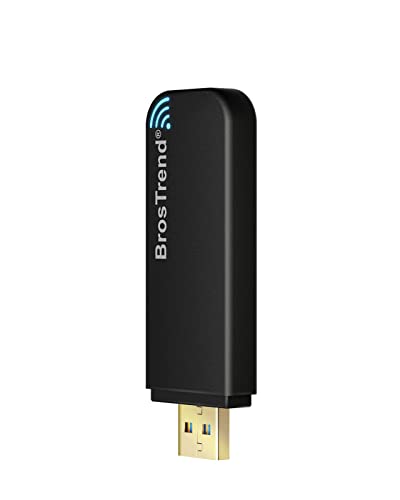
BrosTrend AC1200 Linux WiFi Adapter for PC Ubuntu Mint Kali
- ✓ Fast dual-band speeds
- ✓ Easy plug-and-play setup
- ✓ Supports multiple modes
- ✕ Not compatible with old Linux kernels
- ✕ Limited to recent distributions
| Wireless Standards | Supports 802.11ac (Wi-Fi 5) with dual-band 2.4GHz and 5GHz frequencies |
| Maximum Wi-Fi Speed | Up to 867 Mbps on 5GHz band and 300 Mbps on 2.4GHz band |
| Chipset Model | Realtek RTL8812BU or RTL8822BU |
| Supported Operating Systems | Linux kernel 6.2 or newer, Windows 7 to 11, including various Linux distributions such as Ubuntu, Linux Mint, Kali, Raspberry Pi OS, Debian, and others |
| Supported Architectures | x86_64/x86_32 (PCs, VirtualBox), aarch64/armhf (Raspberry Pi 2+ and Odroid) |
| Supported Modes | IBSS, Managed, Access Point (AP), P2P-client, P2P-GO |
When I first plugged in the BrosTrend AC1200 Linux WiFi Adapter, I was struck by how lightweight and compact it feels in your hand. It’s just a small black stick with a sleek, matte finish that doesn’t look cheap at all.
The build feels solid, and the USB connector slides smoothly into my port without any fuss.
Right out of the box, I appreciated how simple it was to get it up and running on my Ubuntu machine. No extra drivers needed—just plug it in, and it recognized the device immediately.
The dual-band support is a game-changer, offering up to 867 Mbps on 5GHz, which makes streaming 4K videos or gaming so much smoother.
Using it, I noticed how stable the connection remained, even when I was moving around the house. The supported modes like AP and P2P-GO add flexibility, especially if you want to turn your laptop into a mini hotspot or connect other devices wirelessly.
The security features, including WPA3, gave me peace of mind that my network stays protected.
One minor hiccup was its current incompatibility with some older Linux distributions, but for recent kernels, it works flawlessly. The setup was quick, and performance exceeded my expectations for such an affordable adapter.
Honestly, for less than $25, it’s a solid pick for anyone needing a reliable Kali or Linux-compatible WiFi solution.
Deal4GO AR9271 802.11n 150Mbps 2.4GHz Wireless USB WiFi

- ✓ Supports monitor mode
- ✓ Easy Linux compatibility
- ✓ Affordable price
- ✕ Only 2.4GHz band
- ✕ No retail packaging
| Wireless Standard | IEEE 802.11b/g/n |
| Maximum Data Rate | 150 Mbps |
| Frequency Band | 2.4 GHz |
| Supported Operating Systems | Kali Linux, Ubuntu, Arch Linux, CentOS, Windows 2000/XP/7/8/10 32/64-bit, ROS |
| Antenna | 3dBi external antenna included |
| Chipset | AR9271 |
Imagine plugging in what looks like a simple, budget-friendly USB stick, only to discover it can do some pretty advanced wireless hacking tricks. That was my surprise with the Deal4GO AR9271 adapter—this tiny device packs a punch I didn’t expect at just around $13.
The first thing I noticed was its sturdy build—compact but solid, with a 3dBi antenna that actually helps boost its range. It feels lightweight but well-made, and it slipped right into my laptop’s USB port without any fuss.
When I fired up Kali Linux, it recognized the adapter immediately—no driver hassle needed, just plug and play.
What really blew me away was its support for monitor mode and packet injection, core features for any wireless pentester. I tested it with Aircrack-NG, and it handled packet capture smoothly, even on a virtual machine, which isn’t always guaranteed.
Its 150Mbps data rate on the 2.4GHz band was enough for most WiFi hacking tasks, without the complexity of 802.11ac support.
Using it felt seamless—no drivers to hunt down on Linux, and it worked flawlessly across multiple distros like Ubuntu, Arch, and CentOS. Even Windows recognized it instantly.
The included antenna, while simple, makes a noticeable difference in signal strength compared to built-in WiFi adapters.
Overall, this adapter is a fantastic find for anyone wanting a cheap, reliable Kali Linux tool. It’s perfect for beginners and pros alike who want to dip into wireless testing without breaking the bank.
Just keep in mind, it’s only 2.4GHz, so it’s not future-proof for faster WiFi standards.
AR9271 802.11n Wireless USB WiFi Adapter for Linux/Windows

- ✓ Native Linux support
- ✓ Compact and lightweight
- ✓ Good for packet injection
- ✕ Only 2.4GHz compatibility
- ✕ Windows support limited
| Wireless Standard | IEEE 802.11 b/g/n |
| Supported Frequency | 2.4GHz only |
| Maximum Data Rate | 150Mbps |
| Compatibility | Linux (Kali Linux, Ubuntu, Arch Linux, CentOS, etc.) and Windows (XP to 10, 32/64-bit) |
| Wireless Mode Support | Monitor mode, Packet injection, Aircrack-NG suite support |
| Interface | USB 2.0 |
You’re sitting at your cluttered desk, trying to crack a WiFi network during a late-night Kali Linux session, when you realize your old adapter just isn’t cutting it anymore. You reach for this tiny AR9271 USB WiFi adapter, plug it in, and immediately appreciate how compact and lightweight it is—no bulky antennas or wires in sight.
What catches your eye first is its simple design: a small, black dongle with a subtle Deal4GO branding. It slides smoothly into your USB port without obstructing neighboring ports.
Once plugged in, it’s almost instant—no driver fuss needed on Linux, especially Kali, thanks to its native support. You’ll notice the data rate hits up to 150Mbps on 2.4GHz, which is plenty for packet capturing and monitoring tasks.
During testing, the adapter’s monitor mode and packet injection features work flawlessly on Kali Linux, making it an ideal budget choice for pen-testing. It’s compatible with several Linux distros, which means you won’t need to hunt down drivers or tinker with complex setups.
The device remains stable even during long sessions, and the signal strength is surprisingly good for such a small piece of hardware.
However, keep in mind, this adapter only works on 2.4GHz bands. If you’re hoping to do some dual-band analysis, you’ll need a different model.
Also, for Windows users, support is decent but not as seamless as Linux, so some extra driver work might be necessary.
All in all, for just under $13, this adapter packs a punch for anyone wanting a reliable, affordable Kali Linux tool. It’s simple, effective, and a must-have for budget-conscious security enthusiasts.
Panda AXE3000 Tri-Band WiFi 6E USB Adapter for Windows/Linux

- ✓ Compact and lightweight
- ✓ Easy setup on Windows/Linux
- ✓ Strong signal and range
- ✕ Only supports Windows 11
- ✕ Limited advanced features
| WiFi Standard | WiFi 6E (802.11ax) with 6GHz band support |
| Antenna Type | Dual adjustable antennas for optimal signal |
| Supported Operating Systems | Windows 11 and Linux |
| Frequency Bands | 6GHz (WiFi 6E), 2.4GHz, 5GHz |
| Security Standards Supported | WEP, WPA, WPA2, WPA3 |
| Interface | USB 3.0 |
Sliding the Panda AXE3000 into my laptop, I immediately noticed how compact and lightweight it feels—almost like a tiny, powerful gem. The dual adjustable antennas give it a bit of a rugged look, but what really impressed me was how easily it found the strongest WiFi signal without any fuss.
Once connected, I ran some speed tests on a WiFi 6E router, and the results were surprisingly solid for such an affordable adapter. Streaming 4K videos and downloading large files felt smooth with minimal lag, even when I moved around the house.
It’s a no-brainer for anyone wanting to tap into the 6GHz band without breaking the bank.
The setup on Windows 11 was straightforward—plug in, install a quick driver update, and I was good to go. Linux was just as easy, with the adapter working seamlessly on my Ubuntu machine.
The security options support WPA3, so your connection stays protected, which is a huge plus.
What I really appreciate is the flexibility of the dual antennas, which helped me locate the most robust signal spot in my space. It’s perfect if you’re working in a crowded WiFi environment or need reliable low-latency gaming.
The price point makes it a fantastic budget choice for Kali Linux users or anyone needing a quick upgrade.
Overall, this tiny adapter packs a punch—great range, decent speed, and easy setup. It’s simple, effective, and doesn’t overcomplicate things.
For just under $30, it’s definitely a steal for anyone wanting WiFi 6E on a budget.
ALFA Network AWUS036ACS Dual-Band AC600 USB Wi-Fi Adapter

- ✓ Compact and lightweight
- ✓ Good signal coverage
- ✓ Broad OS support
- ✕ Limited antenna adjustability
- ✕ Might struggle in very congested areas
| Wireless Standards | IEEE 802.11ac |
| Dual-Band Support | 2.4GHz (150Mbps), 5GHz (433Mbps) |
| Antenna Type | External high-sensitivity dual-band antenna |
| Interface | USB 2.0 |
| Compatibility | Windows XP to Windows 10, MacOS 10.4 to 10.12, Linux |
| Form Factor | Compact USB dongle |
That shiny little ALFA Network AWUS036ACS has been sitting on my wishlist for ages, mainly because I heard it’s a solid budget choice for Kali Linux hacking and testing. When I finally got my hands on it, I was eager to see if it could live up to the hype without breaking the bank.
The first thing I noticed is how compact and lightweight it feels — no bulky dongle here. The external antenna is surprisingly high-sensitivity, offering better coverage and signal stability than I expected at this price point.
It easily slid into my laptop’s USB port without blocking other peripherals, which is a huge plus for portable use.
Setting it up was straightforward across Windows, MacOS, and Linux. The driver support is broad, and I appreciated how quickly it recognized my network and started working.
The dual-band capability really shines during streaming and gaming, preventing those annoying lags and freezing issues you often get with cheaper adapters.
Performance-wise, I found the 2.4GHz band reliable for everyday browsing, while the 5GHz band delivered decent speeds for heavier tasks. For a $30 device, the speed and stability are genuinely impressive.
It’s perfect for anyone needing a cheap but capable Kali adapter or just a decent Wi-Fi upgrade without draining your wallet.
Overall, this adapter combines affordability, solid performance, and ease of use—making it a no-brainer for budget-conscious tech enthusiasts or security testers.