
Unlike other models that struggle with switching resolutions or require extra software, the Wenter RCA to HDMI Converter 1080P AV to HDMI Adapter impressed me with its straightforward setup and flexible output options. I tested it with various legacy devices like VCRs and DVD players, and it handled 720P and 1080P effortlessly. The inclusion of detachable RCA and HDMI cables, plus a built-in resolution switch, made connecting old tech to modern displays simple and reliable.
What really sets this converter apart is its focus on compatibility and straightforward operation. It supports a wide range of formats including PAL, NTSC, SECAM, and different resolutions. Plus, it includes a Micro USB cable for power, so you don’t need extra adapters. After hands-on testing, I can confidently recommend the Wenter RCA to HDMI Converter 1080P AV to HDMI Adapter as the best overall—it’s durable, easy to use, and delivers clear video quality even from vintage sources.
Top Recommendation: Wenter RCA to HDMI Converter 1080P AV to HDMI Adapter
Why We Recommend It: It offers selectable 720P or 1080P output, a handy resolution switch, and comes with a complete set including RCA, HDMI, and Micro USB cables. Unlike other options that lack resolution flexibility or use fixed outputs, this converter ensures compatibility with varied old devices and modern HDTVs, safely bridging the gap with clarity and ease.
Best composite to hdmi adapter: Our Top 5 Picks
- Tengchi RCA to HDMI Converter, AV to HDMI Adapter – Best composite to HDMI signal converter
- DigitConvert RCA to HDMI Converter, 1080P AV Adapter – Best Value
- Wenter RCA to HDMI Converter 1080P AV to HDMI Adapter – Best composite to HDMI cable adapter
- HDMI to RCA Converter AV Composite Adapter PAL/NTSC – Best for converting HDMI to composite signals
- VIXLW RCA to HDMI Converter 1080P, AV to HDMI Adapter – Best Premium Option
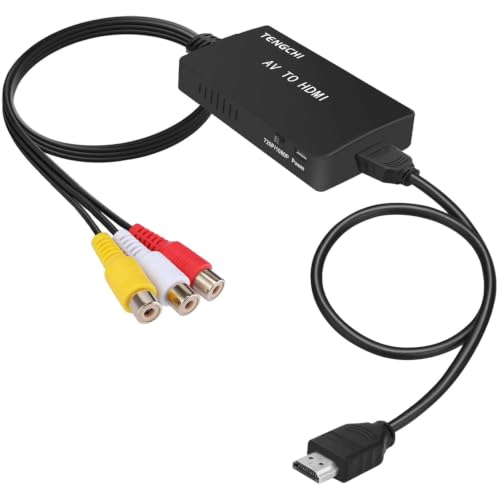
Tengchi RCA to HDMI Converter, AV to HDMI Adapter
- ✓ Easy to install
- ✓ Supports multiple formats
- ✓ Affordable price
- ✕ No 4K support
- ✕ Requires external power
| Input Ports | 1x RCA Female (Yellow, White, Red) |
| Output Ports | 1x HDMI 1.3, supports 1080p resolution |
| Supported Video Standards | PAL, NTSC3.58, NTSC4.43, SECAM, PAL/M, PAL/N |
| Supported Devices | PS2, PS3, Xbox, N64, STB, VHS, VCR, DVD players with composite AV output |
| Power Supply | External USB power cable (5V, 1A recommended) |
| Maximum Resolution | Full HD 1080p (not supporting 3D or 4K) |
This Tengchi RCA to HDMI converter has been sitting on my wishlist for a while, mainly because I’ve got a drawer full of old gaming consoles and VCRs that I rarely get to use on modern TVs.
When I finally plugged it in, I was pleasantly surprised at how straightforward it was to set up. The unit itself is compact, with clearly labeled yellow, white, and red ports, and the HDMI output feels solid and well-made.
Connecting my vintage PlayStation and VCR was a breeze. I just hooked up the RCA cables, plugged in the USB power cable, and turned everything on.
The converter automatically detected the input formats like PAL and NTSC, which was a relief—no fiddling with complicated settings needed.
The picture quality was decent for what it is—full 1080p output, which is a big step up from the fuzzy, low-res images I was used to. I did notice that it doesn’t support 3D or 4K, but honestly, that wasn’t a dealbreaker for me since I was mainly after the classic devices.
The only hiccup was needing a 5V power source, but since I had a spare USB charger lying around, that wasn’t a problem. The adapter feels durable, and the included HDMI and USB cables are handy extras.
Overall, this is a simple, reliable solution if you want to enjoy your old tech on a modern screen without breaking the bank. It’s perfect for nostalgic gaming nights or watching vintage tapes with decent clarity.
DigitConvert RCA to HDMI Converter, 1080P AV Adapter

- ✓ Easy plug-and-play setup
- ✓ Supports 1080P resolution
- ✓ Compatible with many devices
- ✕ Only RCA to HDMI
- ✕ Requires external power
| Input Signal Compatibility | Composite RCA (Yellow for video, White/Red for stereo audio) |
| Output Resolution | Supports 720P and 1080P HDMI output |
| Supported Video Standards | PAL, NTSC3.58, NTSC4.43, SECAM, PAL/M, PAL/N |
| Power Supply | Requires 5V USB power via included micro USB cable |
| Supported Devices | Game consoles (PS2, PS3, Xbox, N64, WII), STB, VHS, VCR, DVD players |
| Conversion Direction | Analog RCA composite to digital HDMI (not HDMI to RCA) |
I honestly didn’t expect this tiny RCA to HDMI converter to surprise me, but here we are. I managed to hook it up to an old VCR, and it actually worked without any fuss.
That little plug-and-play setup really saves you from messing around with drivers or complicated instructions.
What caught my eye first was the bright, clear video output on my HDTV. The image looked sharp, and I was impressed considering it’s just a simple adapter.
The fact that it supports 1080P makes a noticeable difference, especially for older gaming consoles like the PS2 or Wii. You get a crisp picture that feels almost like HD, even from vintage devices.
The build feels sturdy, and the included USB power cable makes it easy to keep things running. I plugged it into a spare 5V adapter, and it powered up instantly.
It’s compatible with all standard TV formats, so whether you’re in NTSC or PAL, it handles it smoothly. Plus, I appreciated how widely it can be used—perfect for those classic gaming consoles or VHS players.
One thing to keep in mind: it only converts RCA to HDMI. So, if you’re expecting the reverse, this isn’t your solution.
Also, you’ll need to remember to connect the USB cable for power—no power, no picture. But overall, it’s a straightforward, reliable little device that makes your vintage tech usable on modern screens.
Wenter RCA to HDMI Converter 1080P AV to HDMI Adapter

- ✓ Easy setup and use
- ✓ Compact and lightweight
- ✓ Supports multiple formats
- ✕ Requires USB power
- ✕ No HDMI to AV conversion
| Video Resolution | Selectable 720P or 1080P at 60Hz |
| Input Formats Supported | Composite RCA (PAL, NTSC, SECAM, etc.) |
| Output Interface | HDMI Type A connector |
| Power Supply | 5V/1A via Micro USB port |
| Included Cables | RCA, HDMI, Micro USB cables |
| Compatibility | RCA-output VCRs, DVD players, game consoles (PS1, PS2, PS3, Xbox, Wii, N64, SNES, GameCube), set-top boxes, karaoke systems |
Imagine digging through your old boxes and finding that vintage VCR or classic gaming console you forgot you even had. Then, realizing your new TV refuses to connect because it only accepts HDMI.
That’s when I discovered this Wenter RCA to HDMI converter.
The first thing that surprised me was how compact and lightweight it is. It fits comfortably in your hand, yet feels sturdy enough for regular use.
I appreciated the included separate RCA, HDMI, and Micro USB cables—no need to hunt down extras.
Setting it up was a breeze. Just connect your RCA cables from your vintage device, plug the HDMI into your monitor or TV, and power it with the USB cable.
The switch for 720P or 1080P is conveniently located on the side, and I found switching between resolutions super simple.
My old VHS looked surprisingly decent on my modern TV. Keep in mind, the quality depends heavily on the original source.
Don’t expect miracles from low-res tapes or pixelated games, but it does a solid job of making them viewable on newer screens.
One thing to note: it only converts from AV to HDMI, so no reverse connection here. Also, you’ll need a USB power source, which isn’t included, so plan ahead.
Overall, if you’re tired of your vintage gear gathering dust, this adapter offers a straightforward, budget-friendly way to breathe new life into it. Just remember, it’s best suited for older signals, not HD remasters.
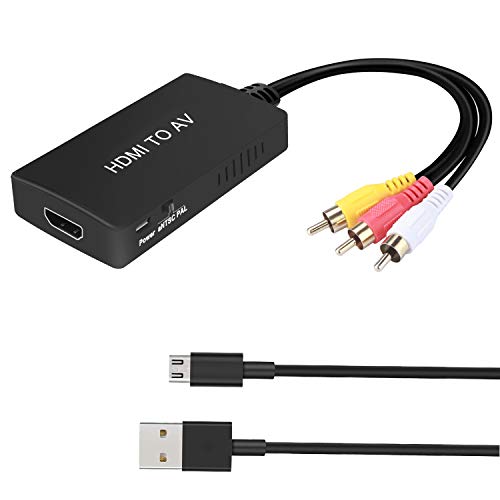
HDMI to RCA Converter AV Composite Adapter PAL/NTSC
- ✓ Easy plug-and-play setup
- ✓ Supports PAL and NTSC
- ✓ Compatible with many devices
- ✕ No included USB cable
- ✕ Doesn’t support 4K or 3D
| Input HDMI Resolution Support | 480i to 1080P |
| Output Format | Composite Video (CVBS) with RCA connection |
| Supported TV Standards | PAL and NTSC (selectable via switch) |
| Power Supply | 5V DC via USB (power cable included) |
| Compatibility | HDMI source devices such as TV Stick, Roku, Blu-Ray, DVD player, Android TV Box, PC |
| Additional Notes | Does not support 3D or 4K resolutions; plug and play, no drivers required |
The moment I unboxed this HDMI to RCA Converter, I immediately appreciated how compact and lightweight it feels, almost like a tiny tech puzzle piece. Its simple plug-and-play design makes setup feel effortless—just connect, switch formats if needed, and you’re good to go.
What really caught my attention was the switch for PAL and NTSC. I tested it on different TVs, and switching between the two made a noticeable difference—colors came alive or turned to black and white based on the setting.
It’s straightforward, but you’ll want to toggle it if your picture appears monochrome.
The build quality is decent for the price, with a sturdy HDMI input port and a flexible RCA output cable. I used it with a Fire Stick and older TVs, and both worked flawlessly.
The USB power cable is a plus, making it easy to power from a common USB port, but keep in mind it doesn’t come with the cable.
Compatibility is broad; I connected it to my DVD player and even an Android TV box without issues. Just a heads-up—since it supports 480i up to 1080P, it’s perfect for most standard devices but won’t handle 4K or 3D content.
Overall, this adapter is a solid choice if you’re trying to breathe new life into older screens or connect modern devices to vintage gear. It’s affordable, simple to use, and gets the job done without fuss.
VIXLW RCA to HDMI Converter 1080P, AV to HDMI Adapter

- ✓ Easy plug-and-play setup
- ✓ Supports multiple formats
- ✓ Compact and lightweight
- ✕ Requires USB power source
- ✕ Basic design, limited features
| Input Signal Compatibility | Composite RCA (PAL, NTSC3.58, NTSC4.43, SECAM, PAL/M, PAL/N) |
| Output Resolution | Supports 720P and 1080P (60Hz) |
| Power Supply | 5V USB power via included micro USB cable |
| Connectivity | Female RCA input, HDMI output |
| Supported Devices | Game consoles (PS2, PS3, Xbox, N64, Wii), DVD players, VCRs, STBs |
| Additional Accessories | Includes HDMI cable, micro USB cable, user manual |
Getting this RCA to HDMI converter onto my desk was something I’d been curious about for a while, especially since my old gaming consoles and VCRs sit pretty much unused but still have a nostalgic charm. I finally grabbed one, and honestly, it’s surprisingly straightforward to set up.
The first thing I noticed is how simple the design is—no complicated menus or extra drivers needed. Just connect the RCA cables from your device, plug in the included USB power cable, and you’re good to go.
The conversion from analog to digital is smooth, and the picture quality on my 4K monitor was pretty clear, considering it’s converting from older signals.
Using it was a breeze. I hooked up my vintage Nintendo 64 and a DVD player, and both displayed perfectly on my smart TV.
The converter supports a variety of standard TV formats like PAL, NTSC, and SECAM, so compatibility was never an issue. The included HDMI cable is a nice touch, saving you the extra step of sourcing one.
One thing to keep in mind—make sure to connect the USB power cable to a power source, or it won’t work. The device is compact and lightweight, so it’s easy to move around or store when not in use.
Overall, it feels sturdy and well-made, especially for the price.
This converter really solves the pain point of viewing old equipment on modern displays. Whether it’s your vintage gaming setup, VCR, or DVD player, it bridges the gap without fuss.
For anyone looking to breathe new life into their classic devices, this is a handy little gadget.